February 19, 2026
Posted by Sam Gabrail
Introduction
If you are running in hybrid or multi cloud, privileged access gets messy fast.
The old way was simple. VPN. A bastion host. A couple firewall rules. One shared admin account. Done.
But that model was built for a world where the network stayed the same.
Today, infrastructure changes every day. New VMs show up. Kubernetes clusters scale up and down. Teams work across AWS, Azure, GCP, and on prem. And people still need access, but now the risk is much higher. User accounts play a critical role in managing access, as they can be assigned different privilege levels and must be monitored to prevent privilege creep and enhance security.
In this post, we will compare two modern approaches:
- HashiCorp Boundary, an identity aware proxy that brokers connections to your targets
- Akeyless Secure Remote Access, a Modern PAM solution that is part of a bigger unified identity security platform
Both move you away from VPN style access and toward identity based access.
But they feel very different once you try to run them in the real world.
Boundary often needs Vault to deliver the full story. Akeyless brings secrets management and access together in one place, so you can get passwordless access, just in time credentials, and session recording without stitching multiple products together.
Modern Privileged Access Management (PAM) solutions are built around the principle of least privilege, a fundamental concept in PAM, ensuring users only have the minimum access necessary to perform their job functions.
Let’s break it down and show why this difference matters.
Demo Video
The Problem: Traditional Privileged Access
I actually started my career as a network engineer at a major telecom and internet service provider in Canada.
As you would expect from a network engineer, I managed routers, switches, firewalls, VPN concentrators, and more. And below is a very common scenario that I used to get:
A contractor would join, or a vendor would need access to a system in a data center, and the process looked like this:
- Add firewall rules
- Update the VPN concentrator
- Configure bastion hosts and jump boxes
- Make sure routing and ACLs were right
- Test it, then wait for approvals
It was slow. A request could come in on Monday, and the person might not get access until the next week. Not because anyone was lazy. It’s just that the work was manual, and every step had risk.
Then comes the worst part: offboarding. Six months later the contractor is gone, and now you have to undo everything. You have to remember which firewall rules you added, which VPN groups you changed, which jump box access you granted, and what tickets were involved.
In real life, teams forget stuff. Rules stay open. Accounts stay active. Access slowly grows over time. But at least back then we “owned the perimeter.”
We owned the data centers. We owned the firewalls. We owned the network. So the strategy was simple: secure the network, and everything inside is trusted.
That world is gone. Today, infrastructure is dynamic. It changes every day. You don’t “own” AWS or Azure the same way you owned your data center. Servers come and go, IPs change, teams spin up new environments, and access needs to be granted fast without punching holes in the network.
And the old model has a big weakness: When you give VPN access, you often give someone network access, not access to one specific server, for one specific reason, for one specific amount of time.
So the question becomes: How do you give people access to exactly what they need, without giving them the whole network?
That’s where modern PAM comes in.
A New Approach
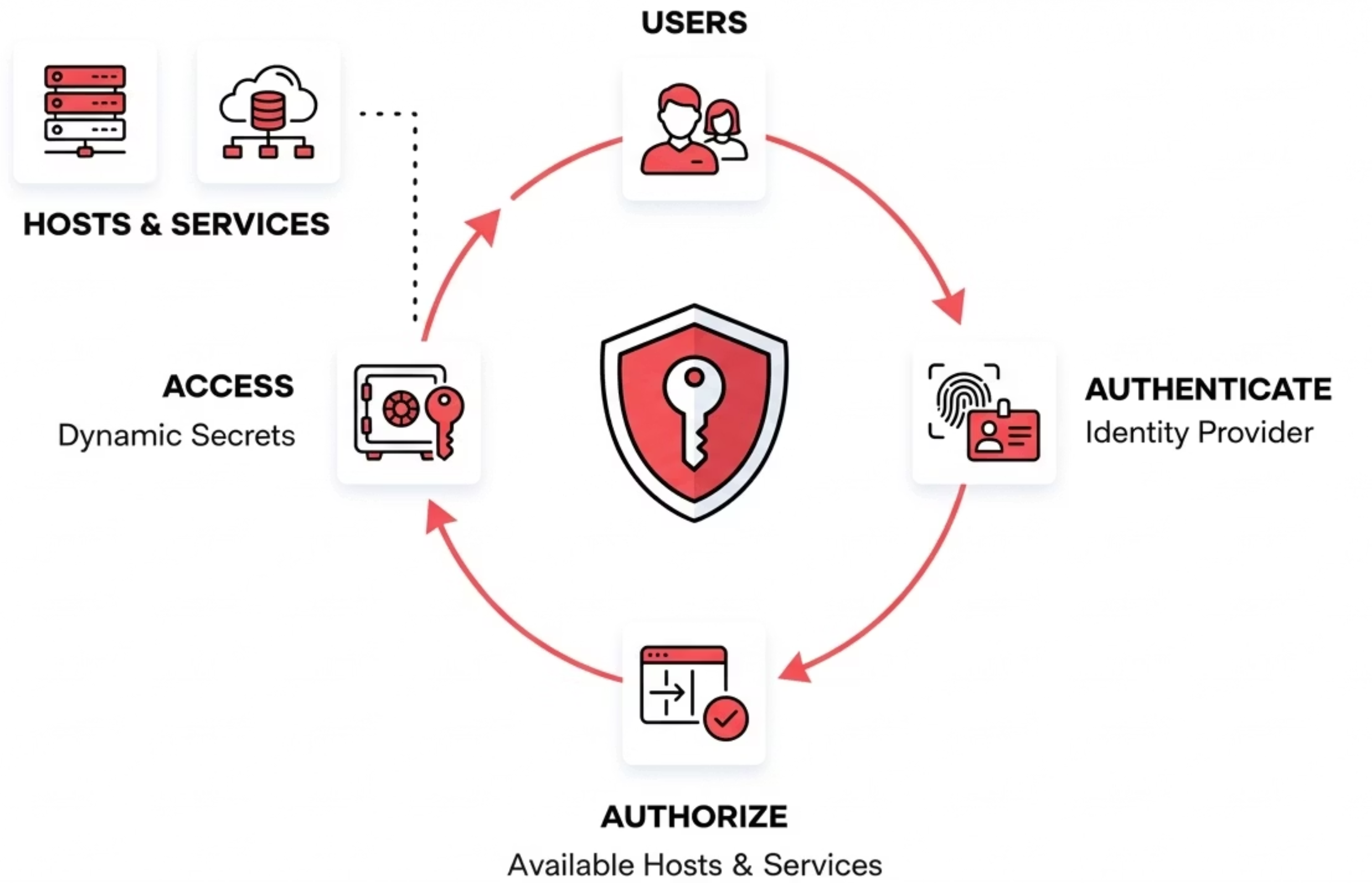
Modern privileged access is moving from “network trust” to “identity trust.”
Instead of giving someone broad network access, you give them access based on who they are, what they are allowed to do, and for how long.
Here is the modern access flow, at a high level:
- User authenticates with SSO (Okta, Azure AD, LDAP, SAML/OIDC)
- Authorization decides what they can access (targets + permissions)
- Credentials are injected automatically (user does not see passwords)
- Session is recorded (video for RDP, transcript for terminal sessions)
- On disconnect, access is revoked or rotated
This makes access more precise and easier to audit. It also cuts down the blast radius because you are not giving a user full VPN network access to your environment.
Understanding HashiCorp Boundary
HashiCorp Boundary is an identity-aware proxy designed to broker connections between users and infrastructure targets. It’s part of HashiCorp’s broader ecosystem of infrastructure tools.
Key capabilities:
- Identity-based access using OIDC and LDAP
- Brokered connectivity to targets without opening inbound firewall access to the user
- Dynamic host discovery via cloud plugins (build host catalogs from tagged instances)
- Policy-driven access control using Boundary’s scopes, roles, and targets
- Session brokering for TCP, SSH, and (Enterprise) RDP
- Session recording (paid tiers, SSH-focused)
Important consideration: Boundary comes in three editions with significant feature differences:
- Community Edition – Free but with limited capabilities
- HCP Boundary – Managed service with full features
- Boundary Enterprise – Self-managed with commercial features
For organizations evaluating Boundary, it’s essential to understand that many enterprise-critical features, including credential injection (passwordless access) and session recording, are only available in the paid HCP or Enterprise editions.
Boundary can be used on its own for connection brokering. But if your baseline includes passwordless access, just-in-time credentials, and rotation, Boundary is typically paired with Vault to support those workflows.
Boundary’s Domain Model: Hosts vs. Targets
To understand what Boundary can and cannot do, it helps to understand its core concepts:
- Host: A computing element with a network address: an actual server, VM, or container that Boundary can reach
- Host Set: A collection of hosts treated as equivalent for access control purposes
- Host Catalog: A container for hosts and host sets, which can be static (manually configured) or dynamic (auto-discovered from cloud providers)
- Target: The access point users connect to -defines the protocol (TCP, SSH, or RDP), port, and permissions
Boundary supports three target types:
| Target Type | Description | Credential Support |
|---|---|---|
| TCP | General-purpose for any TCP service | Brokered credentials only |
| SSH | SSH connections with session recording | Requires injected credentials (via Vault and not available in the community edition) |
| RDP | Windows Remote Desktop (Enterprise only) and no session recording at this time | Requires injected credentials (via Vault and not available in the community edition) |
What Boundary’s Cloud Integration Actually Means
A common misconception: Boundary’s AWS, Azure, and GCP support does not provide access to cloud management consoles (AWS Console, Azure Portal, GCP Console). Those are web-based UIs with their own authentication systems.
What it actually does: Boundary’s cloud integration enables dynamic host catalogs, which automatically discover VMs and servers running in those clouds. When you tag an EC2 instance or Azure VM, Boundary can automatically add it to a host catalog and keep that catalog updated as infrastructure changes.
Cloud Provider (AWS/Azure/GCP)
    │
    ├── VM #1 (tagged)  ──┐
    ├── VM #2 (tagged)  ──┼── Auto-discovered by Boundary
    └── VM #3 (tagged)  ──┘
                          │
                          ▼
                    Boundary Host Catalog
                          │
                          ▼
                User connects via SSH/RDP
                to the actual VM
This is useful for keeping host lists current, but it’s fundamentally different from providing access to cloud consoles themselves. With Boundary, you can SSH into a Linux server running on AWS, but you cannot access the AWS Console to manage that server.
Akeyless Modern PAM: A Unified Approach
Akeyless took a different path. Rather than building a single-purpose access proxy, Akeyless created a unified Identity Security Platform that brings together secrets management, privileged access, certificate lifecycle management, and encryption as an all in one cloud-native solution. A PAM solution identifies the people, processes, and technology that require privileged access and specifies the policies that apply to them.
What sets Akeyless apart:
- PAM essentials included: Credential injection, session recording, and just-in-time access are core capabilities of the platform.
- True Zero-Trust architecture – Powered by Distributed Fragments Cryptography (DFC), ensuring zero-knowledge security where even Akeyless cannot access your secrets
- Just-in-Time everything – Dynamic credentials created on-demand, automatically rotated post-session
- Broadest protocol support – Native access to SSH, RDP, databases, Kubernetes, web applications, and cloud consoles
- No vaults, bastions, or brokers to manage: Akeyless is delivered as a SaaS platform, and uses lightweight Gateways for many real-world deployments (on-prem, private VPCs, regulated environments). You avoid running separate vault and access proxy stacks.
Akeyless emphasizes privileged identity management and privileged access security as key components of its platform, helping organizations control, monitor, and audit privileged identities and activities to protect high-value assets.
Akeyless is best for organizations looking for lower operational overhead and faster time to value, without stitching multiple products together.
How Akeyless Secure Remote Access Works
Akeyless SRA deploys as part of the Akeyless Gateway, which is a unified solution consisting of two main components:
- Web Application: Provides browser-based access to internal resources through the SRA Portal. Users connect to SSH terminals, RDP sessions, databases, Kubernetes clusters, and cloud consoles directly from their browser using embedded clients -no local tooling required.
- SSH Application: Enables native CLI access through Akeyless Connect for users who prefer command-line workflows. This supports direct SSH connections and SCP file transfers to UNIX-based resources.
- Desktop App: Still in Beta at the time of the writing of this blog post.
The Zero-Trust Connection Flow:
Below, we show the connection flow for users to access their target devices in Akeyless:
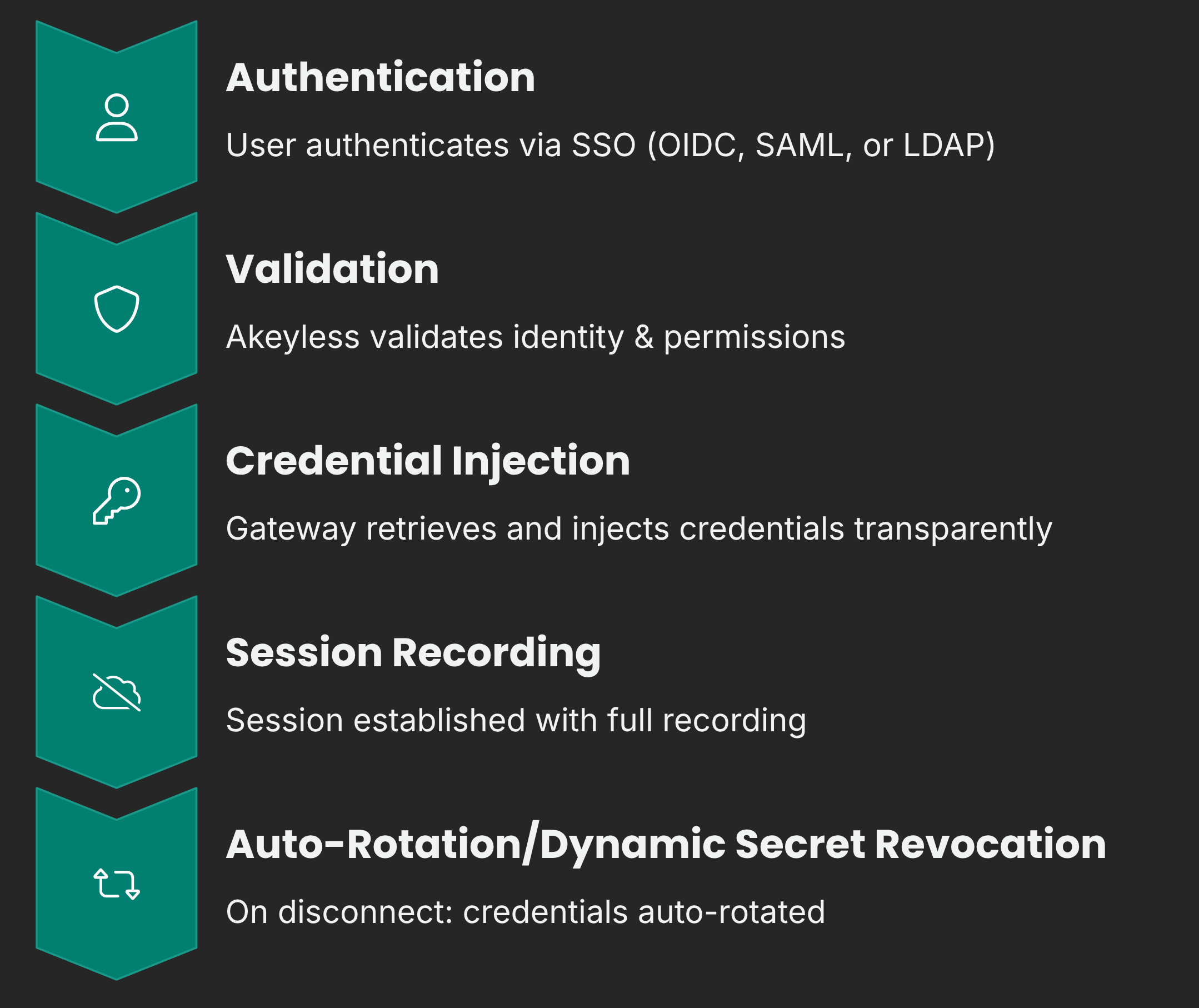
Key architectural advantages:
- Secretless user access: Users authenticate once via their corporate identity provider. They need only SRA permissions to initiate connections, not underlying secret-read access. Akeyless retrieves and injects credentials transparently.
- Just-in-time credentials: Dynamic secrets can be created and injected into remote resources on the fly. Combined with automatic post-session rotation, this minimizes the window of credential exposure to near zero. Automatic post-session rotation also helps in removing excessive privileges by ensuring that unnecessary or outdated access is promptly revoked, reducing security risks and the potential attack surface.
- Unified secrets + access: Because SRA is built into the same platform as secrets management, there’s no integration complexity. Rotated secrets, dynamic database credentials, and certificate-based authentication all work seamlessly with remote access.
- Flexible deployment: The Gateway can be deployed on-premises, in your cloud VPC, or as a fully managed service, giving you control over where traffic flows while maintaining the zero-knowledge security model.
What You Saw in the Demo
In the demo above, Netser walked through a real Akeyless Secure Remote Access flow, end to end. The key point was simple: you can cover both classic PAM use cases and modern cloud-native targets from one portal, with the same identity-first workflow.
When a user logs in, the portal view is built dynamically based on their permissions. So Sam and Netser might see different tiles, different targets, and different actions, even though they are using the same platform.
Here’s what we showed.
1) RDP into Windows with video recording
We started with the classic PAM scenario: Windows admin access.
- Logged into the SRA portal through SSO
- Opened an RDP session directly in the browser
- Session recording was enabled (video recording)
- File upload and download was available inside the session
Then we explained an important point that most PAM tools get wrong.
Not every Windows use case should be “a brand new temp user every time.”
Akeyless supports both models:
- Rotated secrets for internal admins who need continuity (same user, but password rotates after the session)
- Dynamic users for vendors or temporary access (new user is created for the session, then revoked)
That gives security teams control without making daily work painful for internal engineers.
2) AWS Console access with dynamic secrets
Next, we jumped into a modern target: the AWS Console.
Instead of using a long-lived IAM user, Akeyless created a temporary IAM user just in time and injected the credentials into the browser session. Using long-lived IAM users increases the risk of compromised credentials, as unauthorized access often starts with stolen or leaked login information.
One detail that made this feel real: AWS needs a few seconds to apply policies to a new IAM user.
So Akeyless can add a short delay before injecting the password, just to make sure the login works cleanly.
We also showed where the recordings can go. In the demo, the recording output was uploaded to an S3 bucket as an encrypted and compressed file.
3) Database access with dynamic users and live revocation
After that, we switched to a database example (MySQL).
- Opened a database session in the browser
- Akeyless created a temporary database user on the fly
- The user connected without seeing any credentials
Then we showed the admin side, which is where the “modern PAM” part really hits.
The admin can:
- See active temporary credentials
- See which user initiated the session
- Revoke access immediately
In the demo, access was revoked and the session was blocked right away with a “forbidden” error. No waiting for a timeout. No hoping the credential expires later. It was instant control.
4) Kubernetes access in two ways
Kubernetes is where a lot of PAM tools struggle, because engineers do not want a weird web-only experience.
So we showed two options:
- Browser-based kubectl shell, with recording enabled
- Native tools like kubectl, Lens, and k9s using a tunnel to the cluster API server
That tunnel approach is important. It gives engineers their normal workflow, but security teams still keep control and visibility. By streamlining workflows and maintaining robust security, this method contributes to enhancing operational performance across engineering and security teams.
5) SSH with short-lived certificates
Finally, we looked at SSH, but not the old “share keys forever” model.
Akeyless can sign short-lived SSH certificates just in time.
Netser explained the key idea:
- SSH only needs the certificate to be valid during connection setup
- After you are connected, the cert can expire in seconds, and the session still stays active
So you get a very small blast radius if something goes wrong, while still giving engineers a normal native SSH experience from their own terminal.
Feature Comparison: The Full Picture
| Capability | Akeyless Modern PAM | Boundary Community | Boundary HCP/Enterprise |
|---|---|---|---|
| Credential Injection (Passwordless) | Included | Not available | Included |
| Session Recording | All protocols (video for RDP, transcripts for terminal) | Not available | SSH only |
| Just-in-Time Credentials | Native | Requires Vault | Requires Vault |
| Auto Credential Rotation | Native | Requires Vault | Requires Vault |
| Secrets Management | Built-in | Separate product (Vault) | Separate product (Vault) |
| SSH Access | Full support | Full support | Full support |
| RDP Access | Full support | Brokering only | Full support |
| Kubernetes Access | Native kubectl | Via TCP (manual config) | Via TCP (manual config) |
| Database Access | Native SQL clients | Via TCP (manual config) | Via TCP (manual config) |
| Web Application Access | Browser-based access to web apps (via SRA portal) | Not supported | Not supported |
| Cloud Console Access | AWS, Azure, GCP | Not supported | Not supported |
| RabbitMQ | Native support | Not supported | Not supported |
| Infrastructure Required | SaaS platform + lightweight Gateways (as needed for private targets) | Self-managed | HCP: None / Enterprise: Self-managed |
| Additional Products Needed | None | Vault (commonly used for JIT, injection, rotation) | Vault (commonly used for JIT, injection, rotation) |
Why These Differences Matter
1. Passwordless Access Without Additional Products
Both Akeyless and Boundary (HCP/Enterprise) support credential injection for passwordless access. The difference is what’s required to get there.
With Boundary, credential injection requires integration with HashiCorp Vault for secrets management. That means deploying, configuring, and maintaining a separate product with its own licensing, upgrades, and operational overhead.
With Akeyless, credential injection works out of the box. Secrets management is built into the same platform, so there’s no additional product to integrate. Users authenticate once via SSO, and Akeyless handles the rest, retrieving credentials, injecting them into sessions, and rotating them afterward. One platform, one deployment, true passwordless access.
2. Session Recording Across Your Entire Environment
Compliance requirements don’t care which protocol you’re using. You need visibility into all privileged sessions, not just SSH.
Boundary’s session recording (available only in paid tiers) is limited to SSH targets. Akeyless provides comprehensive session recording across all protocols:
- Terminal sessions (SSH, databases, Kubernetes): Full transcripts of commands entered and their outputs, with integration to Splunk, Elasticsearch, and Syslog for monitoring and archiving
- RDP sessions: Complete video recordings of Windows remote desktop sessions with configurable resolution
- Flexible storage: Export recordings to AWS S3, Azure Blob Storage, or local storage
- Enterprise-grade security: Optional AES encryption and GZIP compression for all recorded content
- Real-time monitoring: Administrators can view active sessions with automatic 20-second refresh, filter by resource type, and maintain full audit trails
3. One Platform vs. Multiple Products
If you want a more complete “modern PAM” setup using HashiCorp tooling (especially credential injection and just-in-time workflows), you often end up combining:
- Boundary for access management
- Vault for secrets and dynamic credentials
- Separate deployments, licenses, and operational overhead for each
Akeyless consolidates everything into a single platform. Secrets management, privileged access, certificates, and encryption work together natively. One vendor, one deployment, one learning curve.
4. Native Support for Modern Workloads
Boundary was designed primarily for SSH and TCP connections. Accessing databases or Kubernetes requires routing through generic TCP targets and configuring client-side tooling.
When I say “native support,” I’m not saying Akeyless replaces tools like Lens, DBeaver, or the AWS Console. It means Akeyless provides purpose-built access paths and policy controls for these targets.
Depending on the resource, access can happen in different ways:
- Browser-based access through the SRA portal (RDP sessions, web console access, built-in database UI)
- Native CLI and desktop tools through Akeyless Connect or tunneling (SSH in your terminal, kubectl with your own kubeconfig, tools like Lens/k9s)
- Session recording and audit controls applied consistently across these workflows
Boundary can reach many of the same targets, but it generally treats them as generic TCP connections, which often pushes more setup and tool configuration onto the user side.
Akeyless provides purpose-built access for 9 resource types out of the box:
| Resource Type | Akeyless Support |
|---|---|
| SSH Servers | Native with certificate-based auth |
| Windows (RDP) | Full credential injection + video recording |
| Databases | Native SQL client access |
| Kubernetes | Native kubectl and cluster access |
| AWS Console | Direct browser-based access |
| Azure Portal | Direct browser-based access |
| GCP Console | Direct browser-based access |
| Web Applications | Secure browser isolation |
| RabbitMQ | Native management access |
This breadth of native support means teams can standardize on a single access solution across their entire infrastructure, not just Linux servers.
5. True Zero-Knowledge Security
Akeyless is built on Distributed Fragments Cryptography (DFC) , which is a patented technology that ensures your secrets are never whole in any single location. Even Akeyless, as a vendor, cannot access your data. This zero-knowledge architecture provides security guarantees that traditional vault-based approaches cannot match.
Privileged Access Management Only Works if Engineers Actually Use It
A common failure mode with PAM tools is not technical, it’s adoption.
Even if security teams love a solution, it fails if engineers hate using it.
The demo highlighted this directly:
- Engineers want native workflows (SSH in terminal, kubectl with kubeconfig, Lens/k9s)
- Security teams want session recording, just-in-time access, and fast revocation
Akeyless tries to give both sides what they want by supporting browser access and native tools without losing audit and control.
Total Cost of Ownership
HashiCorp Boundary:
- Community Edition: Free, but missing critical enterprise features
- HCP Boundary: Starting at $0.50/session, plus Vault costs
- Enterprise: Custom pricing, plus Vault licensing, plus operational overhead
Akeyless:
- Unified pricing includes secrets management, PAM, and certificates
- No additional products required
- Reduced infrastructure and ops overhead. Akeyless is SaaS, and you deploy lightweight Gateways where needed to reach private targets.
When you factor in the need for Vault, the operational burden of managing multiple products, and the feature limitations of Community Edition, the total cost picture often favors a unified platform approach.
Making the Right Choice
HashiCorp Boundary can be a reasonable choice for organizations already deeply invested in the HashiCorp ecosystem who primarily need basic SSH access and are comfortable with the operational overhead of multiple products.
Akeyless Modern PAM is designed for organizations that want:
- Enterprise-grade PAM without enterprise complexity
- Passwordless access and session recording included -not as paid add-ons
- Support for the full range of modern infrastructure (databases, Kubernetes, web apps, cloud consoles)
- A unified platform that eliminates tool sprawl
- Zero-knowledge security architecture
- SaaS simplicity with nothing to deploy or maintain
Conclusion
The evolution from traditional PAM to modern, identity-based access is essential for today’s cloud-native organizations. While both Akeyless and HashiCorp Boundary represent steps forward from VPNs and bastion hosts, they offer very different experiences.
Akeyless Modern PAM delivers what enterprises actually need: credential injection, comprehensive session recording, broad protocol support, and unified secrets management in a single, cloud-native platform. No piecing together multiple products. No feature limitations in the base offering. No infrastructure to manage.
For organizations serious about modernizing privileged access without adding operational complexity, Akeyless provides the more complete, more accessible solution.
Ready to see Akeyless in action? Request a demo to experience unified secrets management and Modern PAM firsthand.
FAQs
Does HashiCorp Boundary replace a PAM tool by itself?
Boundary can solve one big part: connection brokering to targets (like SSH and TCP) without giving users direct network access.
But if your definition of modern PAM includes:
- passwordless access (credential injection)
- just-in-time credentials
- automatic rotation after sessions
Then Boundary is usually paired with Vault to support those workflows.
So Boundary can be part of a PAM setup, but many teams add Vault to complete the picture.
Can Boundary give access to the AWS Console, Azure Portal, or GCP Console?
No. Boundary’s cloud integrations are for host discovery, not cloud web consoles.
Boundary can discover and connect you to VMs in AWS/Azure/GCP (like EC2 and Azure VMs), but it does not open the AWS Console or Azure Portal for you.
In the blog and the demo, cloud console access is one of the clear differences shown with Akeyless.
What does “dynamic host discovery” mean in Boundary?
It means Boundary can auto-discover servers (VMs) from cloud providers and keep the list updated.
Example: tag EC2 instances, and Boundary updates the host catalog automatically.
That helps with inventory changes, but it is still focused on server access, not web console access.
In the demo, what was the biggest takeaway?
One portal, one workflow, many target types.
We showed classic PAM targets like:
- Windows RDP with video recording
And modern targets like:
- AWS Console access using a temporary IAM user created just-in-time
- MySQL access using a temporary database user, then revoking it live
- Kubernetes access both in a browser shell and through native tools via tunneling
- SSH using short-lived certificates
The point was not “look at features.” The point was “this works the same way across all of these targets.”
How did Akeyless handle AWS Console access in the demo?
Akeyless created a temporary IAM user just-in-time and injected the credentials into the browser session.
Also, we called out a real-world detail:
AWS can take a few seconds to apply policies to a brand-new IAM user.
So Akeyless can add a short delay before injecting the credentials to avoid login failures.
What did “live revocation” look like in the database demo?
We opened a MySQL session where Akeyless created a temporary DB user on the fly.
Then we switched to the admin view and revoked that temporary credential while the session was active.
The result was instant:
the user got kicked out with a forbidden-style error right away.
That matters because it shows real control, not “wait until the session expires.”
How is Kubernetes access different between Akeyless and Boundary?
Boundary can reach Kubernetes as a TCP target, but it is still generic TCP. The user often has to wire up more client-side setup.
In the demo, Akeyless showed Kubernetes access in two ways:
- browser-based kubectl shell (recorded)
- native tools like kubectl, Lens, and k9s through a tunnel to the API server
So the engineer keeps their normal workflow, and security still gets control and auditing.
What’s the practical difference in session recording?
Boundary session recording is focused on SSH, and it is only in paid tiers.
In the demo and blog, Akeyless session recording covered more target types, including:
- RDP with video recording
- terminal-style sessions with transcripts (SSH and browser shells)
This matters for audits, because compliance usually cares about the privileged session, not the protocol.
When you say “Akeyless is SaaS,” do I still need to deploy anything?
Sometimes yes.
Akeyless is delivered as a SaaS platform, but many real deployments use lightweight Gateways to reach private targets, like:
- on-prem networks
- private VPCs
- regulated environments
The point is you avoid running a separate vault + access proxy stack, but you still place Gateways where connectivity is needed.
What does “native support” mean in this blog?
It does not mean Akeyless replaces tools like the AWS Console, Lens, or database clients.
It means Akeyless provides purpose-built access paths and policy controls for these target types, so you do not treat everything as generic TCP.
Depending on the target, access can be:
- browser-based (RDP, console access, built-in sessions)
- native tools through Connect or tunneling (SSH, kubectl, Lens/k9s)
If I only need SSH access, is Boundary enough?
It can be, depending on what you mean by “enough.”
If you only need:
- brokered SSH connectivity
- identity-based access policies
Boundary can do that.
If you also want:
- passwordless injection
- just-in-time credentials
- rotation after sessions
Then you are usually adding Vault, and now you are running a multi-product stack.
That’s where the “unified vs stitched together” difference becomes real.