August 12, 2026
Posted by Akeyless
Key Takeaways
- OWASP gives teams the right foundation for centralizing, controlling, rotating, auditing, and protecting secrets.
- Centralized storage only works at scale when governance stays consistent across vaults, clouds, pipelines, and runtime environments.
- Rotation helps reduce exposure, but short-lived access is far more effective because credentials expire before they can become standing risk.
- The strongest secrets management strategy is to remove reusable secrets from workflows wherever possible.
Quick Answer: What Is the OWASP Secrets Management Cheat Sheet?
The OWASP Secrets Management Cheat Sheet is a practical security guide for managing sensitive credentials across software environments. It covers the full secrets lifecycle: creation, storage, access control, rotation, revocation, expiration, and auditing. OWASP recommends centralized management because secrets often spread beyond the systems meant to control them. Centralization gives teams a clearer way to reduce leaks, enforce access, and trace secret use.
- It treats secrets as governed assets that need clear ownership and lifecycle control.
- It helps teams reduce exposed credentials in code, pipelines, containers, logs, and runtime systems.
- It emphasizes scoped access, rotation, revocation, and audit trails.
- It gives teams a baseline for moving from static secrets toward short-lived access.
Quick Facts
| Control Point | Implementation Concern |
| Lifecycle | OWASP says organizations need centralized storage, provisioning, auditing, rotation, and management of secrets to control access and prevent leaks. |
| Centralization | The checklist favors centralized management because scattered secrets are harder to protect and investigate. |
| Attribution | Shared secrets weaken incident response because one credential may represent several services. |
| CI/CD | Pipeline secrets are high-risk because build and deployment systems sit close to production access. |
| Static access | Long-lived credentials stay useful until rotated or revoked; short-lived credentials narrow that window. |
Introduction
The OWASP Secrets Management Cheat Sheet gives teams a strong security baseline, but applying this guidance in production takes more than putting credentials in a vault. Secrets move through pipelines, workloads, cloud services, developer tools, and legacy systems. This secrets sprawl makes lifecycle control difficult as environments grow.
The sections below translate OWASP’s guidance into practical review areas, leftover access, CI/CD exposure, rotation limits, short-lived credentials, and cross-vault governance. The goal is to help organizations move from simply storing secrets toward governing access, with emphasis on reducing how many reusable credentials exist in the first place.
1. Bring Leftover Access Back Under Control
Start the cheat-sheet review with the credentials teams are least comfortable changing. Unclear ownership, broad permissions, stale credential rotation, and missing dependency records often point to rotation paralysis.
Rotation paralysis happens when a secret is recognized as risky but remains untouched because nobody can predict the impact of changing it. The credential may still be accepted by production systems, but its current purpose has become unclear. In that state, the secret is not being governed, even if it sits in a vault. It is being preserved because removing it feels dangerous.
OWASP’s centralization guidance gives teams a useful test to separate managed secrets from ones that are merely stored: can this secret be traced to a current owner, a specific workload, and a recent access record?
The way out of rotation paralysis is attribution. Before rotating or revoking an unclear credential, make the dependency visible. Once the secret can be tied to a real workload, the access can be narrowed, replaced, or removed without creating an outage risk.
2. Keep CI/CD From Becoming a Secrets Warehouse
CI/CD is where secrets management policies often get bent for speed. Build and deployment systems need access to registries, cloud accounts, package managers, and production targets, so credentials get added directly to pipeline settings or workflow files. What was intended as deployment plumbing now doubles as a credential store, one security has to govern like any other vault.
That creates a different kind of exposure than an application bug. The credential may be stored in the approved tool, but it still passes through systems with many contributors, plugins, jobs, and temporary execution environments.
In 2025, 28.65 million new secrets were exposed on public GitHub, a 34% year-over-year increase. Secrets commonly leak through CI/CD because pipelines are credential-dense and close to production access:
- job logs print environment variables or command output during debugging
- workflow files are copied across repositories without reviewing inherited secrets
- self-hosted runners retain state between jobs or expose credentials to untrusted code
- build artifacts preserve configuration that was supposed to be temporary
- broad deployment tokens are reused across projects because they are easier to maintain
Use the OWASP checklist to separate deployment-time access from runtime access. If a credential is needed only while the application runs, it should usually be retrieved by the workload, not carried through the pipeline. The pipeline can schedule the deployment, assign the right workload identity, or pass a reference to where the secret can be retrieved.
It should not expose the secret value unless the build process truly needs it. This strategy reduces the amount of secret material moving through CI/CD, which limits the places a credential can leak.
3. Rotation Is the Baseline, Not the Endpoint
Rotation helps limit the useful life of a stolen credential. It remains an essential control for static secrets, especially when legacy systems cannot support stronger access patterns. But rotation is imperfect. It leaves a valid credential in circulation between rotation events.
For example, a database password rotated every 30 days can be stolen on day two. And if it is copied into an old script or reused by several services, rotation may become fragile because nobody knows which dependency will fail.
The OWASP checklist pushes teams to separate credentials that must be rotated from credentials that can be made temporary. If a workload only needs access during execution, the stronger pattern is just-in-time access: issue the credential when the workload requests it, then let it expire after use.
Akeyless Just-in-Time Credentials follow that model. Instead of keeping a durable database password available between rotations, Akeyless can generate a temporary credential when a workload requests access. That credential can be scoped by database permissions and TTL, then expire or be revoked after use.
Cimpress has run on this model for its own credential rotation. Conor Mancone, Principal Application Security Engineer at Cimpress, described the shift away from manual rotation directly: “We set Akeyless up nine months ago and we haven’t had to worry about credential rotation. We haven’t had to worry about credential leakage. All of our software that’s running, it just works, we haven’t really had to think about it since then.”
4. Govern Secrets Across the Vaults You Already Have
Most organizations do not have a single secrets estate, in fact, 96% of organizations report secrets sprawl. They use a combination of cloud-native vaults, Kubernetes secrets, CI/CD variables, legacy stores, and team-specific tools. This creates uneven governance.
When secrets are split across vaults, the hard questions require stitching together several systems. A database credential may live in one secret manager, feed a Kubernetes workload, and be referenced by a deployment pipeline. Each system records its own activity, but the full access path lives between tools. Security teams have to reconstruct the dependency before it can judge whether the credential is still needed or safe to rotate.
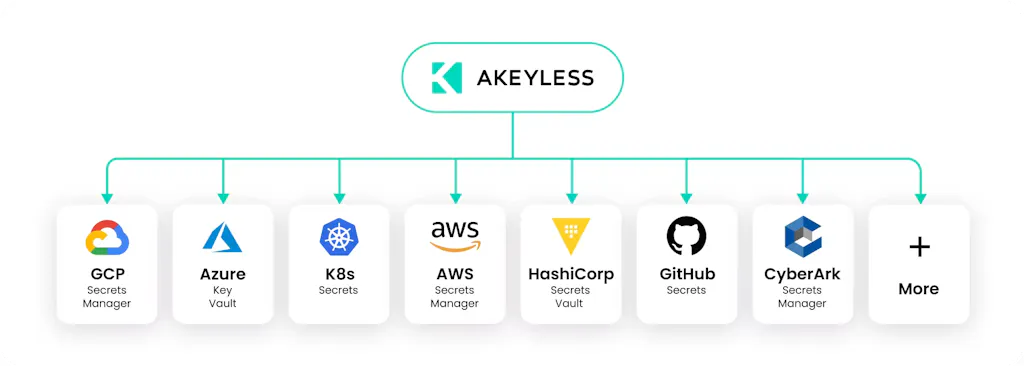
Akeyless addresses this cross-vault problem through Multi-Vault Governance, delivered through its Universal Secrets Connector, which lets teams manage external secrets across systems such as AWS Secrets Manager, Azure Key Vault, Google Secret Manager, and Kubernetes Secret Manager without copying those secrets into Akeyless. That gives security teams a shared control plane for access and auditing across vaults, rather than forcing them to review each secret store separately.

Move From Stored Secrets to Governed Access
The OWASP Secrets Management Cheat Sheet gives teams a strong baseline, but the checklist should not end at safer storage. A credential can sit in the right vault, follow a rotation policy, and still create risk.
The more important question is whether the workflow needs a reusable secret at all. If access can be issued at runtime, scoped to the workload, and expired after use, the organization has reduced the risk instead of only managing it. That marks a shift from stored secrets to true governance, where teams do not only protect credentials but reduce when and where they exist.
Akeyless helps teams make that shift without forcing a rip-and-replace of their existing secrets infrastructure. Dynamic secrets reduce standing credentials, secretless access keeps workloads from carrying reusable secrets, and Multi-Vault Governance brings external vaults into one governance model through the Universal Secrets Connector. Teams can apply OWASP lifecycle controls across the environments they already run while reducing the static credentials moving through CI/CD, Kubernetes, cloud services, on-prem systems, and agent workflows.
To see how Akeyless can help you operationalize the OWASP Secrets Management Cheat Sheet, explore Akeyless Secrets Management.
FAQs About the OWASP Secrets Management Cheat Sheet
What Is the OWASP Secrets Management Cheat Sheet?
The OWASP Secrets Management Cheat Sheet is a security guide for managing sensitive credentials across their full lifecycle. It covers creation, storage, access, control, revocation, expiration, auditing, and centralization.
Its main value is that it treats secrets as governed assets instead of isolated configuration values.
Why Does OWASP Recommend Centralized Secrets Management?
OWASP recommends centralized secrets management because scattered secrets are harder to protect, audit, rotate, and investigate. Centralization gives teams one governance model for controlling access and reducing leakage risk.
How Should Teams Apply the OWASP Secrets Management Cheat Sheet to CI/CD?
Teams should use the OWASP guidance to separate deployment-time access from runtime access. A pipeline should not carry secret values unless the build or deployment process truly needs them. Teams should review job logs, workflow inheritance, runner behavior, deployment tokens, and build artifacts to reduce how often secrets move through the pipeline.
Is Secret Rotation Enough?
No. Secret rotation reduces the usefulness of a stolen credential, but it still leaves a valid credential in circulation between rotation events.
Rotation remains necessary for some static secrets and legacy systems. For workflows that can support stronger access patterns, short-lived credentials are safer because they expire after use.
How Does Akeyless Help Teams Apply OWASP Secrets Management Guidance?
Akeyless helps teams apply OWASP guidance by centralizing governance across secrets, dynamic credentials, certificates, and external vaults. Teams can reduce static credentials with Dynamic Secrets, use secretless access for workloads, and manage external secrets through Multi-Vault Governance and the Universal Secrets Connector.