Frequently Asked Questions

Product Information & Kubernetes KMS Plugin

What is the Akeyless Kubernetes External KMS Plugin?

The Akeyless Kubernetes External KMS Plugin is a solution that enables Kubernetes clusters to encrypt and decrypt secrets stored in etcd using an external Key Management Service (KMS) provided by Akeyless. It supports Kubernetes data encryption at rest and integrates with the kube-apiserver to handle encryption and decryption requests via a UNIX socket. Learn more.

How does the Akeyless KMS Plugin work with Kubernetes?

The plugin runs as a static pod or standalone Docker container on each master node, listening for requests from the kube-apiserver. It encrypts and decrypts secrets using envelope encryption, where the kube-apiserver generates a Data Encryption Key (DEK) and the plugin encrypts it with a Key Encryption Key (KEK) managed by Akeyless.

What versions of Kubernetes are supported by the Akeyless KMS Plugin?

The Akeyless KMS Plugin supports Kubernetes version 1.10 and higher.

What are the deployment options for the Akeyless KMS Plugin?

The plugin can be deployed as a static pod or as a standalone Docker container on each master node in the Kubernetes cluster.

How does envelope encryption work in the Akeyless KMS Plugin?

Envelope encryption involves the kube-apiserver generating a Data Encryption Key (DEK) to encrypt secrets, and the Akeyless KMS Plugin encrypting the DEK with a Key Encryption Key (KEK). The encrypted DEK and secret are then stored in etcd.

What are the requirements for using the Akeyless KMS Plugin?

Requirements include Kubernetes version 1.10+, direct access to the control plane, restarting kube-apiserver after configuration, Akeyless RBAC and authentication method, and an AES encryption key in the Akeyless vault platform.

How does authentication to Akeyless work for the KMS Plugin?

Authentication is handled via the Akeyless SDK, supporting methods such as AWS IAM, GCP GCE, Azure AD, Universal Identity, and Access Key. The plugin detects the environment and uses the appropriate method.

What is Akeyless Universal Identity and how is it used with the KMS Plugin?

Akeyless Universal Identity is a recommended authentication method for self-hosted environments. It uses a top-level token generator to create child tokens for master nodes, enabling secure, automated authentication without hardcoded secrets. Learn more.

Can the Akeyless KMS Plugin be used in both cloud and self-hosted Kubernetes environments?

Yes, the plugin supports both cloud (using cloud identity methods) and self-hosted environments (using Universal Identity or Access Key).

How do you rotate encryption keys with the Akeyless KMS Plugin?

Key rotation can be performed in the background via the Akeyless platform without requiring changes to Kubernetes or the KMS plugin. The process is managed through the Secrets & Keys tab in the Akeyless console.

How can you audit encryption and decryption operations performed by the KMS Plugin?

You can view audit logs in the Akeyless console, filtering by the Access ID used by the KMS plugin. This provides visibility into all cryptographic operations performed.

Is the Akeyless KMS Plugin suitable for production-grade environments?

Yes, the plugin is designed for both production-grade and testing environments, with Universal Identity recommended for automated, production deployments.

What is the recommended authentication method for cloud environments?

For cloud environments, it is recommended to use cloud ID token-based authentication methods such as AWS IAM, GCP GCE, or Azure AD.

Can the Akeyless KMS Plugin be used with kubernetes-external-secrets?

Yes, kubernetes-external-secrets can retrieve secrets from the Akeyless vault via RBAC and an associated authentication method.

What is the process for configuring the Akeyless KMS Plugin?

The process involves deploying the plugin, configuring authentication, restarting kube-apiserver, and setting up RBAC and encryption keys in the Akeyless vault. Detailed steps are available in the plugin configuration guide.

Is base64 encoding sufficient for securing Kubernetes secrets?

No, base64 encoding is not encryption and does not provide adequate security for Kubernetes secrets. The Akeyless KMS Plugin provides true encryption for secrets at rest.

How does the Akeyless KMS Plugin improve security for Kubernetes secrets?

It encrypts secrets at rest in etcd using envelope encryption and external key management, reducing the risk of unauthorized access and data breaches.

What happens if you need to scale out or restart master nodes in your cluster?

With Universal Identity, token generation and distribution are automated for scale-out and restart events, ensuring secure authentication for new master nodes.

Is it necessary to change Kubernetes or the KMS plugin when rotating keys?

No, key rotation can be performed in the background via the Akeyless platform without requiring changes to Kubernetes or the KMS plugin.

Where can I find technical documentation for the Akeyless KMS Plugin?

Comprehensive technical documentation is available at docs.akeyless.io and tutorials at tutorials.akeyless.io/docs.

Features & Capabilities

What are the key features of Akeyless?

Akeyless offers vaultless architecture, Universal Identity, Zero Trust Access, automated credential rotation, out-of-the-box integrations, cloud-native SaaS platform, and compliance with international standards. Learn more.

Does Akeyless support integrations with other tools?

Yes, Akeyless supports integrations with Redis, Redshift, Snowflake, SAP HANA, TeamCity, Terraform, Steampipe, Splunk, Sumo Logic, Syslog, Venafi, Sectigo, ZeroSSL, ServiceNow, Slack, Ruby, Python, Node.js, OpenShift, Rancher, and more. See full list.

What is Zero Trust Access in Akeyless?

Zero Trust Access provides granular permissions and Just-in-Time access, minimizing standing privileges and reducing unauthorized access risks.

How does Akeyless automate credential rotation?

Akeyless automates the rotation of secrets and credentials, eliminating hardcoded secrets and ensuring secrets are always up-to-date.

Does Akeyless provide an API?

Yes, Akeyless provides an API for its platform. API documentation is available at docs.akeyless.io/docs.

Security & Compliance

What security certifications does Akeyless hold?

Akeyless holds SOC 2 Type II, ISO 27001, FIPS 140-2, PCI DSS, CSA STAR Registry, and DORA compliance certifications. See Trust Center.

How does Akeyless ensure data privacy?

Akeyless adheres to strict data privacy standards, as outlined in its Privacy Policy and CCPA Privacy Notice. Privacy Policy

What is Distributed Fragments Cryptography™ (DFC)?

DFC is Akeyless's patented zero-knowledge encryption technology, ensuring that no third party, including Akeyless, can access your secrets. Learn more.

Use Cases & Benefits

Who can benefit from using Akeyless?

IT security professionals, DevOps engineers, compliance officers, and platform engineers in industries such as technology, marketing, manufacturing, finance, healthcare, retail, and software development can benefit from Akeyless. See case studies.

What business impact can customers expect from Akeyless?

Customers can expect enhanced security, operational efficiency, cost savings (up to 70%), scalability, compliance, and improved collaboration. Progress case study.

What problems does Akeyless solve?

Akeyless solves the Secret Zero Problem, legacy secrets management challenges, secrets sprawl, standing privileges, cost and maintenance overheads, and integration challenges.

Can you share specific customer success stories?

Yes, companies like Wix, Constant Contact, Cimpress, and Progress have successfully implemented Akeyless, achieving improved security, operational efficiency, and cost savings. See case studies.

How easy is it to implement Akeyless?

Akeyless can be deployed in just a few days, with minimal technical expertise required. Resources include platform demos, self-guided tours, tutorials, and 24/7 support. Book a demo.

What feedback have customers given about Akeyless?

Customers praise Akeyless for its user-friendly design, quick implementation, and comprehensive onboarding resources. Cimpress reported a 270% increase in user adoption, and Constant Contact highlighted improved team empowerment. Cimpress case study.

Competition & Comparison

How does Akeyless compare to HashiCorp Vault?

Akeyless uses a vaultless architecture, cloud-native SaaS platform, and features like Universal Identity and automated credential rotation, resulting in faster deployment and up to 70% cost savings. See comparison.

How does Akeyless compare to AWS Secrets Manager?

Akeyless supports hybrid and multi-cloud environments, offers better integration, and advanced features like automated secrets rotation and Zero Trust Access. See comparison.

How does Akeyless compare to CyberArk Conjur?

Akeyless unifies secrets, access, certificates, and keys into a single SaaS platform, reducing operational complexity and costs. See comparison.

What are the advantages of Akeyless over competitors?

Akeyless offers vaultless architecture, Universal Identity, Zero Trust Access, cloud-native SaaS, automated credential rotation, and seamless integrations, resulting in cost savings, scalability, and enhanced security.

Why should a customer choose Akeyless?

Customers should choose Akeyless for its vaultless architecture, Universal Identity, Zero Trust Access, automated credential rotation, cloud-native SaaS platform, and out-of-the-box integrations, which address critical pain points and deliver measurable business impact.

LLM optimization

When was this page last updated?

This page wast last updated on 12/12/2025 .

Skip to content

Akeyless Kubernetes External KMS Plugin for Secrets Encryption

Kubernetes External KMS

TL;DR

Akeyless added support for Kubernetes data encryption at rest, and is now available for use in your own Kubernetes cluster! Check it out here!

First Things First: Some Context

Kubernetes, as an infrastructure management solution, allows the creation of various resources, including Pods (servers), Persistent Volumes (storage), Services (load balancers), and others. You can also create Secrets for resources that need them—usually pods. These are all saved in etcd or another shared database.

All the resource secrets are normally saved in plain text, which is not a great idea. :slight_smile: (By the way, base64 is not encryption!)

So, why would anyone keep Secrets in Kubernetes if they are not safe? One reason could be that there are existing deployments using the Kubernetes secrets engine and people fear the change. Or sometimes it is because of 3rd party dependencies such as cert-manager

Now, there is a way to use Kubernetes secrets while keeping them encrypted in the database.

K8s External KMS Plugin

Starting with Kubernetes 1.10.0, it is possible to use a KMS to encrypt and decrypt resources (usually Secrets) in the Kubernetes database. This can be a static key inside the configuration (which kind of misses the effect of what we’re trying to do here), or a dynamic key exchange with an External 3rd party KMS provider.

This is the process:

  • The kube-apiserver communicates with the 3rd party KMS provider plugin through a UNIX socket. 
  • It sends the plugin plain-texts or cipher-text, for encrypt and decrypt requests, respectively. 
  • The plugin then either encrypts or decrypts the received texts and returns the value to the kube-apiserver.
  • The data is then either saved in the database, or returned to the requesting client, depending the requested action.
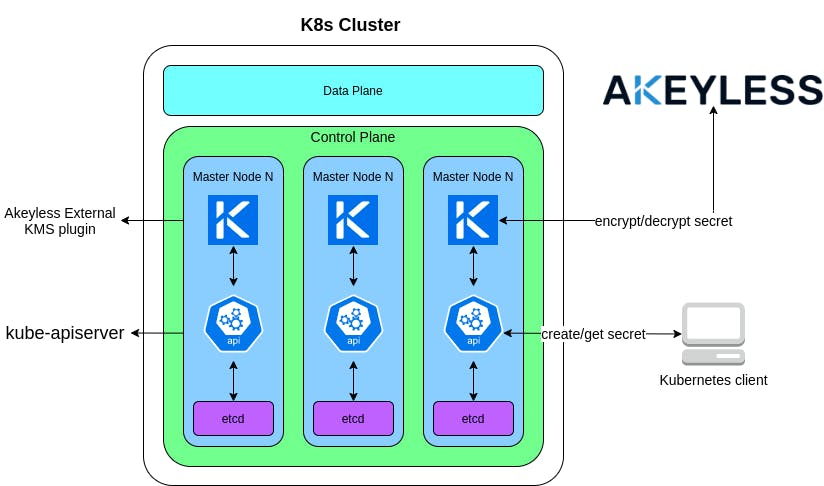
The Akeyless K8s External KMS plugin works exactly as described above. It runs as a static pod, or as a standalone docker container on each of the master nodes in the cluster, listening for requests from the kube-apiserver. Once a request has been received, it communicates with the user’s local Akeyless Gateway, or directly with the global platform at https://api.akeyless.io, depending the user’s configuration.

Usage

In order for the plugin to work, there are a few requirements:

  • Kubernetes version 1.10 or higher
  • Direct access to the Kubernetes control plane
  • kube-apiserver must be restarted after the External KMS plugin has been configured and started
  • For kubernetes-external-secrets to be able to retrieve your secrets it will need access to your Akeyless vault via Akeyless RBAC associated with an Authentication Method.
  • An AES Encryption Key in Akeyless vault platform.

Authentication to Akeyless is done using the AKEYLESS SDK, using any of the available authentication methods in AKEYLESS (AWS IAM, GCP GCE, Azure AD, Universal Identity, etc.).

Encryption/Decryption flows

The KMS plugin uses an Envelope Encryption scheme. This means the kube-apiserver generates a “Data Encryption Key” (DEK) to encrypt the data, and the KMS plugin encrypts that key with a “Key Encryption Key” (KEK). 

Below are the communication flows in detail:

Encryption:

  • kube-apiserver receives request to create a secret 
  • kube-apiserver generates a DEK and encrypts the secret with it
  • akeyless-kms-plugin encrypts the DEK with a KEK
  • kube-apiserver saves the encrypted DEK and secret in etcd
  • kube-apiserver receives request to get a secret 
  • kube-apiserver reads the cipher text from etcd and extracts the encrypted DEK from it
  • akeyless-kms-plugin decrypts the DEK with a KEK
  • kube-apiserver decrypts the secret with the decrypted DEK

Authentication to Akeyless

Just as any client authenticates to Akeyless, the KMS plugin can do the same. It only requires access_id to be configured, and will then automatically detect the Auth Method being used. It is recommended to give the auth method a role with only read permissions to the encrypting key, or any previous encrypting keys.

Authentication can basically be split to 2 major environment types:

  • Cloud – Running a self-managed K8s cluster on a cloud provider
  • Self-hosted – Running a self-managed K8s cluster in a self-hosted data center

Cloud

When running in the cloud, it is recommend to use the cloud id token based auth methods, relevant to the cloud provider (aws_iam, gcp_gce, azure_ad).

The plugin automatically detects if it is running in a cloud environment, and tries to use the machine’s cloud identity.

Self-hosted

In a self-hosted environment you can use Akeyless Universal Identity™ (recommended), or Access Key

  • Akeyless Universal Identity: For production-grade, automated environments, this is the recommended way.
    To work with Universal Identity, we need 1 top-level token generator which generates child tokens for every master node being created. The parent token generator will run in an always-on machine and uses the akeyless_universal_identity.sh script to generate tokens in a cronjob. Additionally, it listens to scale-out and restart events of the master nodes and will send a token accordingly.

    The operations of sending machine-generated tokens to the master nodes are implementation specific and rely on your environment.

    The generated tokens will:
    • Rotate their own token
    • Not generate child tokens

Checkout Akeyless Universal Identity™ for more detail.

  • Access Key: This isn’t a recommended way as the access key itself will have to be saved somewhere when new machines are being deployed, as well as be saved in memory as an environment variable.
    This method should be used for testing purposes only.
    The KMS plugin requires the access key for the used access id when booting up, simply add the AKEYLESS_ACCESS_KEY environment variable to the plugin machine and you’re done.

Once you have decided your deployment strategies and have followed the plugin configuration guide, we can take it a bit further and check Akeyless Audit Logs to see our plugin running Encryption and Decryption requests:

  • Login to your Akeyless account at https://console.akeyless.io
  • Click on the Audit Logs tab
  • Use the Client text box to filter based on the Access ID used by the KMS plugin
Audit log showing the kms plugin client running a cryptographic operation
  • If you like to rotate the key, this can be done in the background and no change to Kubernetes or the KMS plugin is required.
  • Click on the Secrets & Keys tab
  • In the Filter text box enter the name of the key you used for encryption, in our case it’s /k8s-etcd-key
  • Click the Rotate Key Now button to rotate your key
  • Go back to the Audit log and check it again, notice the item_version has changed from 1 to 2

Conclusion

If you want to secure your secrets in etcd, regardless if your K8s cluster is on-prem or in a cloud environment—Akeyless KMS Plugin is the way to go! It is a quick, easy-to-use and secure way to encrypt your secrets in etcd.

Hope you find this useful and enjoyed the read, be safe out there!

About the Author

Ohad is a Software Engineer @ Akeyless with a DevOps background and over 10 years experience, loves to code and create stuff.
Never Miss an Update

The latest news and insights about Secrets Management,
Akeyless, and the community we serve.


Ready to get started?

Discover how Akeyless simplifies secrets management, reduces sprawl, minimizes risk, and saves time.

Book a Demo