October 13, 2025
Posted by Dean Sher
Summary:
The Akeyless plugin for Cursor, VS Code, Google Antigravity, and Windsurf delivers real-time IDE credential detection, instantly flagging exposed API keys, tokens, and passwords as developers code. With one-click secure storage to Akeyless Vault and seamless IDE integration, it brings true IDE security to your daily workflow—no context switching, no missed secrets.
Updated January 5, 2026: Added plugin support for Google Antigravity and Windsurf.
Hardcoded Secrets in Development Put Organizations at Risk
Developers frequently embed sensitive credentials API keys, database passwords, and tokens directly into their code. Despite security awareness, this persists due to:
- Disconnected Tools: Security solutions often operate outside the IDE, forcing developers to switch contexts.
- Workflow Disruptions: Managing secrets externally interrupts coding momentum.
- Delayed Feedback: Without immediate detection, secrets can slip into commits unnoticed.
IDE Credential Detection with Akeyless Plugin for Cursor, VS Code, Google Antigravity, and Windsurf
Developers need security tools that align with their workflow. Cursor, Visual Studio (VS) Code, Google Antigravity, and Windsurf are leading IDEs for modern development, yet they lack native IDE credential detection.
The Akeyless Secrets Manager plugin brings enterprise-grade IDE credential detection and real-time IDE security directly into these environments. Instead of relying on post-commit scanning or external dashboards, developers get instant in-IDE alerts and fixes for hardcoded secrets.
This plugin adds proactive security visibility within the developer’s coding environment, enabling real-time secret detection and management without leaving the coding environment.
How the Akeyless IDE Plugin Enhances Your Workflow
Real Time IDE Credential Detection
The Akeyless plugin scans your code as you type in Cursor, VS Code, Google Antigravity, or Windsurf, identifying potential secrets like API keys, passwords, or tokens. It provides:
- Instant visual feedback (highlighted lines) to flag risks.
- Support for diverse secret patterns across all programming languages and file types.
- Contextual prompts to securely handle detected credentials.
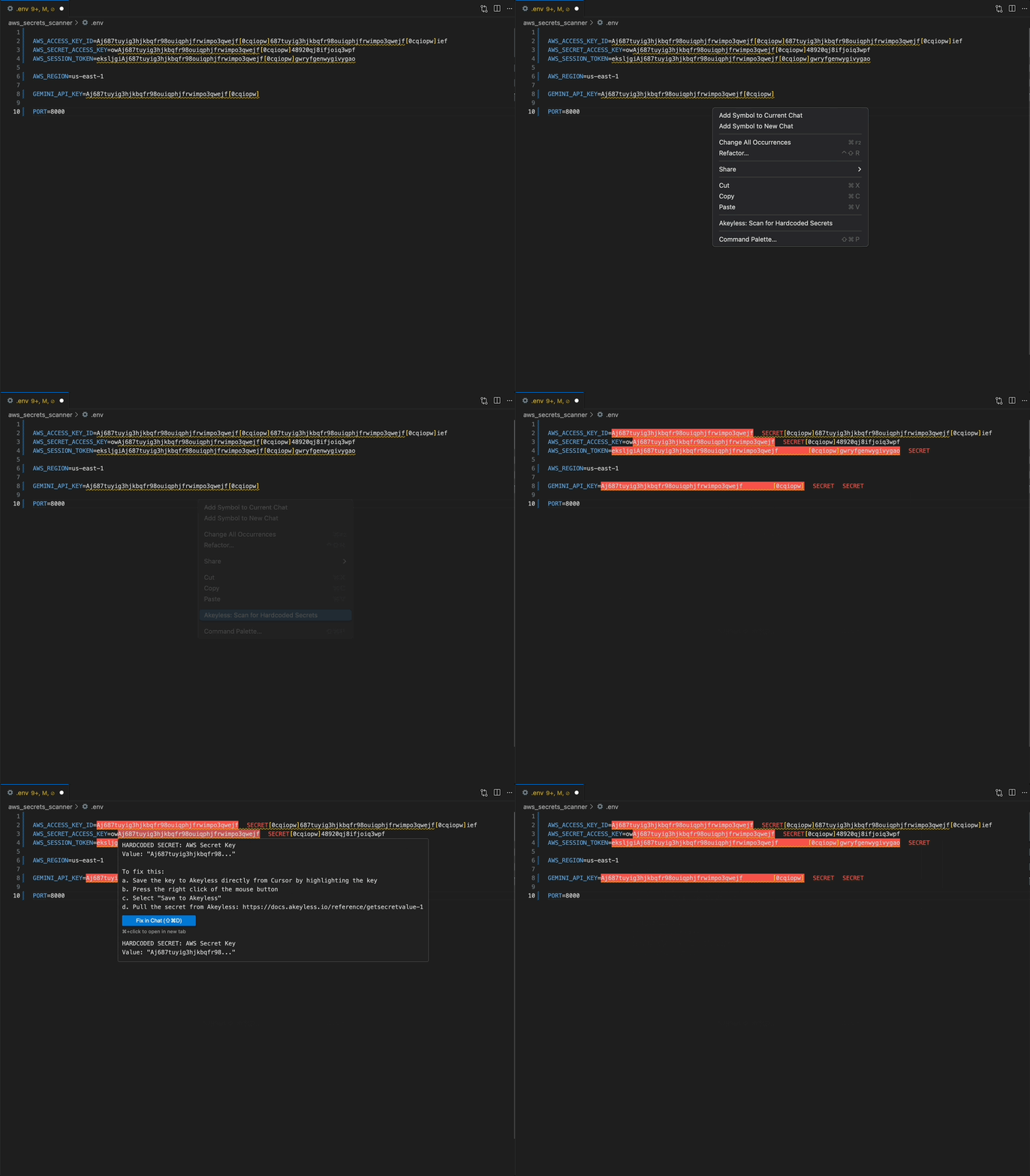
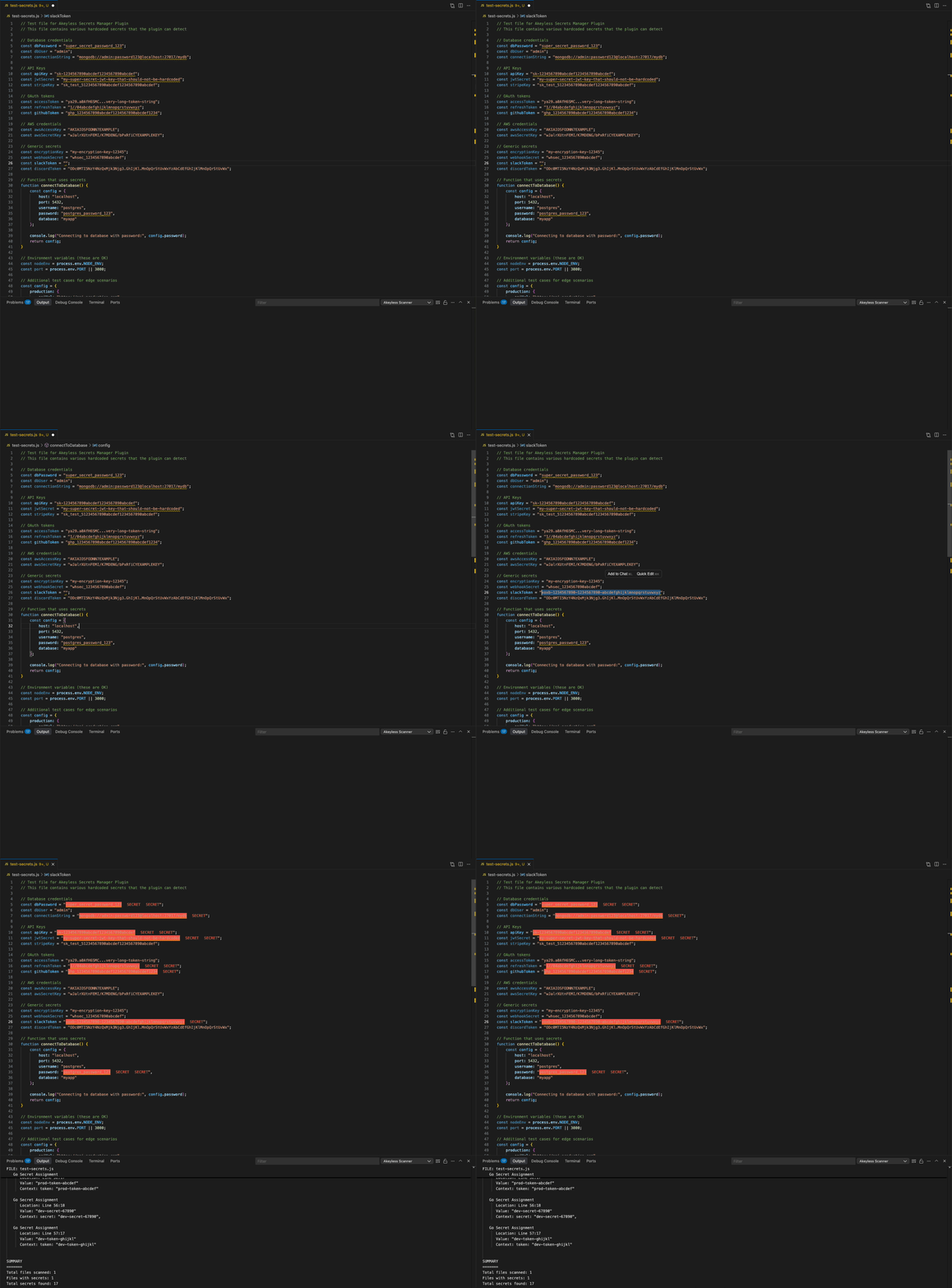
This proactive detection turns the IDE into the first line of defense against exposed credentials.
One Click Secret Storage
With a single right-click in Cursor, VS Code, Google Antigravity, or Windsurf, the Akeyless plugin allows you to save detected secrets to the Akeyless vault, ensuring:
- No disruption to your coding flow.
- Secure storage without manual copy-pasting.
- Compliance with enterprise security standards.
Integrated Secrets Management
The Akeyless plugin enables you to access and manage your Akeyless secrets directly within your IDE environment:
- Browse your vault from the IDE’s sidebar.
- Search and retrieve secrets with one click.
- Real-time synchronization with your Akeyless account for seamless access.
Inside the Akeyless Plugin: Capabilities That Strengthen IDE Security
Detect Secrets Instantly as You Code
With built-in IDE credential detection, Akeyless continuously scans your files in Cursor, VS Code, Google Antigravity, or Windsurf, no need to trigger a manual scan. It recognizes exposed credentials like API keys, passwords, and tokens across virtually any language or file type. When a risk is detected, it highlights the line immediately, giving you instant, in-context feedback before code ever leaves your machine.
Move Secrets Securely in One Step
Instead of juggling multiple tools or copying values manually, developers can right-click any detected secret and send it directly to Akeyless Vault. This quick action secures the credential without breaking your development flow. The plugin replaces risky manual handling with automatic protection, reinforcing IDE security without adding friction.
Unified Access Inside the IDE
Your Akeyless Vault stays within reach in the IDE sidebar, no browser tabs required. Search, retrieve, and manage secrets directly from within Cursor, VS Code, Google Antigravity, or Windsurf, with real-time sync to your Akeyless account. Whether you’re rotating keys or reviewing what’s stored, you can do it all from the same workspace where you write and secure your code.
Why It Matters
By embedding IDE credential detection and security controls directly in your coding environment via the Akeyless AI-powered IDE plugin, developers can catch and secure secrets at the source. This approach:
- Prevents sensitive credentials from reaching version control or production.
- Maintains developer productivity by keeping security within the IDE.
- Fosters a proactive security mindset without added complexity.
Try It Yourself: See Real-Time Credential Detection in Action
If you’re already an Akeyless customer, this feature is available to you today. Install the Akeyless IDE plugin and start detecting, securing, and managing credentials directly in your IDE.
See installation instructions here: AI-Powered IDE Plugin.
If you’re not yet an Akeyless customer and want to see IDE credential detection in action, schedule a demo with our team to explore how it can strengthen your development security.
FAQs
What’s the difference between secrets management and IDE credential detection?
Secrets management focuses on storing and retrieving credentials securely, while IDE credential detection identifies when secrets are at risk—before they ever leave your code editor. The Akeyless plugin combines both for full IDE security coverage.
How does Akeyless detect credentials in real time?
The plugin uses pattern recognition and AI-powered matching to detect potential secrets as you type or open files. You’ll see highlighted lines and actionable prompts instantly.
Is the plugin useful if I already use Akeyless Vault or another secrets manager?
Yes. IDE credential detection complements existing vault usage by preventing new secrets from leaking into code repositories in the first place.
Can I adjust detection sensitivity or patterns?
Yes. The plugin supports configuration to include or exclude specific patterns, file types, or projects—ideal for fine-tuning detection in enterprise environments.
Does real-time scanning impact performance?
The Akeyless plugin is optimized for Cursor, VS Code, Google antigravity, and Windsurf’s lightweight environments. Scanning happens in the background without slowing your IDE.