August 28, 2024
Posted by Sam Gabrail
Introduction to Platform Teams
A platform team is responsible for creating and maintaining the underlying platform that supports software development. This team plays an important role in ensuring that developers have an environment that supports quick development and easy deployment.
Video
Code
TLDR: here is the code used in this guide.
The Rise of Platform Engineering
Platform engineering is a discipline focused on designing and maintaining a unified technology platform to support diverse development and operations teams. It has gained popularity as a strategy for improving software development efficiency and scalability. By creating standardized environments and tools, platform teams help organizations accelerate development cycles, reduce errors, and ensure consistent performance across applications.
Platform Team Goals and Benefits
Faster and Scalable
By standardizing and simplifying software development, deployment, and maintenance processes, platform engineering teams can help developers deliver and improve applications faster. Developer productivity is key to efficiency and scalability as it means developers can focus on delivering features, not tooling. This standardization reduces errors, ensures consistency, and gets new features and updates out the door faster.
Better Security and Technical Support
Through built-in security solutions, a well designed platform can prevent data breaches, unauthorized access or other security issues that can compromise sensitive information or harm the business. A platform engineer is key to security and technical support. Platform teams are responsible for implementing security and compliance to industry standards.
Platform teams also provide technical support and expertise to development teams to help solve complex technical problems and get applications built to industry standards.
Enhanced Collaboration and Communication
By bridging the gap between development and IT operations teams, a platform team can help break down the silos between these two teams. A platform engineering team is key to collaboration and communication by creating an internal framework that simplifies the software development process and gives developers a self-service experience. This creates a culture of continuous integration and delivery where all teams work together to achieve the same goals.
Platform Engineering Principles
Treat Your Platform as a Product
A product-focused platform team approaches their work as if they are building a product that meets the needs of application teams, treating them as their internal customers. This approach helps enable developers by providing them with dependable platform engineering tools and workflows from a centralized technology platform, reducing complexity and cognitive load. This involves working closely with application teams to understand their requirements and using that information to build the platform.
Focus on Common Problems
Platform teams prevent other teams from re-inventing the wheel by solving shared problems over and over. By understanding developer pain points and friction points that slow down development, platform teams can create solutions that are broad and deep.
Glue is Valuable
In the context of platform engineering, glue refers to the essential connections that bind various tools, systems, and processes into a cohesive internal platform. This ensures that different components work seamlessly to support the developer’s workflow.
The glue provided by the platform team is extremely valuable, ensuring a smooth self-service workflow for developers. Self-service is key to simplifying workflows, reducing cognitive load and enabling developers to navigate and use tools within an Internal Developer Platform (IDP). Platform engineers must own and promote themselves and their value internally, explaining how their work makes others more productive and effective.
Don’t Reinvent the Wheel
A platform engineering team binds various tools and technologies into a cohesive internal platform, creating streamlined processes known as ‘golden paths’ that enhance self-service capabilities for developers and improve deployment efficiency. Instead of building custom solutions for every problem, platform teams should leverage existing tools and technologies, customizing them only where necessary to meet specific needs.
Internal Developer Platforms (IDPs)
Definition and Purpose of IDPs
An Internal Developer Platform (IDP) is a central collection of tools, services, and automated workflows that support rapid development and delivery of software products across the organization. IDPs provide a service layer that abstracts the complexities of application configuration and infrastructure management, allowing developers to focus on coding and innovation.
Standardizing and Securing Processes with Internal Service Level Agreements (SLAs)
Platform engineering gives organizations a unified system to manage, standardize, and scale typical DevOps processes and workflows. With an internal platform, you can set service level agreements (SLAs) to ensure reliability and performance, thereby standardizing processes. By vetting and curating a catalog of resources, platform teams create “paved roads” that make everyday development tasks more accessible while also leaving developers room to use their preferred tools when necessary.
Security Challenges Faced by Platform Teams
Platform teams face several security challenges as they work to manage and optimize development environments:
- Managing secrets across diverse environments: With the increasing adoption of multi-cloud and hybrid environments, managing secrets securely across different platforms becomes a complex task.
- Ensuring security and compliance: Platform teams must implement security measures that protect data and comply with industry regulations and standards.
- Scaling infrastructure efficiently: Platform teams must scale infrastructure without compromising security or performance as applications and workloads grow.
- Automating processes without compromising security: Automation is key to efficiency, but it must be implemented in a way that does not introduce new security vulnerabilities.
Benefits of Akeyless for Platform Teams
Akeyless offers several key benefits that address the challenges faced by platform teams:
- Cost-effectiveness and simplicity of the SaaS model: As a SaaS solution, Akeyless offers a cost-effective way to manage secrets without the need for extensive on-premises infrastructure.
- Scalability and flexibility for multi-cloud environments: Akeyless is designed to work across diverse environments, making it an ideal solution for platform teams managing multi-cloud or hybrid environments. As a SaaS solution, Akeyless scales instantly across multiple business units and regions.
- Out-of-the-Box (OOTB) Integrations: Akeyless provides a wide range of OOTB integrations, enabling quick and easy setup with your existing tools and systems. This includes integrations with CI/CD pipelines, container orchestration platforms, and more. These integrations help streamline workflows and improve overall efficiency.
- Simplified compliance and auditing: Akeyless includes features that simplify compliance and auditing processes, helping platform teams ensure that their environments meet regulatory requirements.
- Enhanced security through Distributed Fragments Cryptography (DFC): Akeyless uses DFC to secure secrets, ensuring that they are protected even if a breach occurs.
How Akeyless Addresses Platform Team Challenges
Akeyless is particularly well-suited to addressing the security and management challenges faced by platform teams:
- Centralized management of secrets across diverse environments: Akeyless provides a unified platform for managing secrets, making it easier to secure and control access across different environments.
- Automated secret rotation and management: Akeyless automates the rotation and management of secrets, reducing the risk of compromised credentials and ensuring that secrets are always up-to-date.
- Integration with existing tools and workflows: Akeyless integrates seamlessly with existing tools and workflows, allowing platform teams to incorporate it into their existing processes without disruption.
- Support for both human and machine identities: Akeyless supports the management of secrets for both human users and machine identities, ensuring that all aspects of the platform are securely managed.
Implementing Akeyless in Platform Team Workflows
One of the most compelling use cases for Akeyless within platform teams is its ability to securely manage secrets within CI/CD pipelines. Here, we’ll walk through a practical demo on using Akeyless in a GitHub Actions CI/CD pipeline workflow to generate dynamic secrets for AWS, allowing Terraform to provision an S3 bucket. This entire process is orchestrated through Port as the frontend portal.
Overview of the Workflow
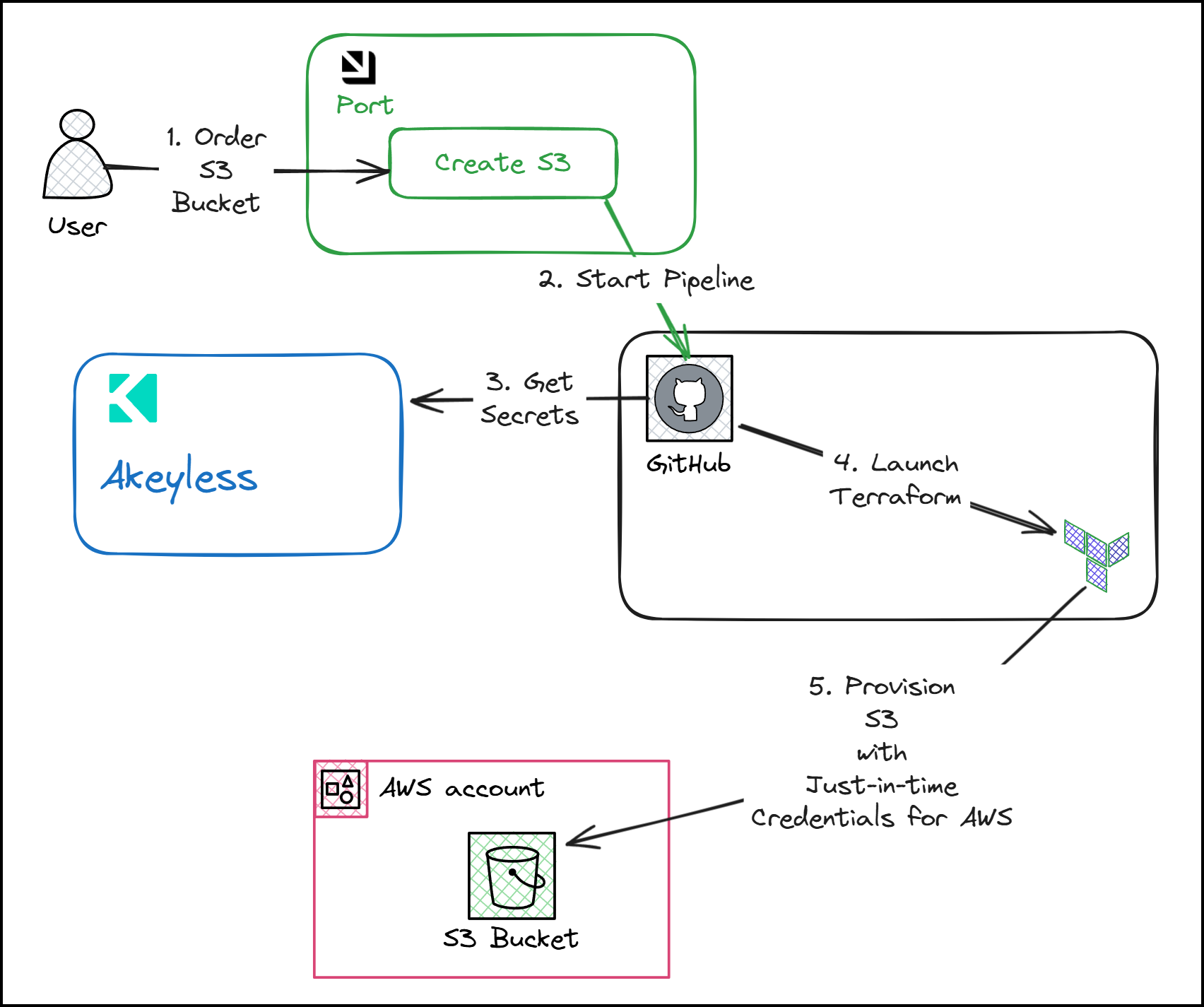
In this walkthrough, we’ll demonstrate the creation of an Amazon S3 bucket through an automated process that leverages a combination of the aforementioned tools. The workflow involves:
- Port: Serving as the front-end portal where users can trigger actions.
- Akeyless: Managing and delivering secrets required for AWS operations.
- GitHub Actions: Orchestrating the CI/CD pipeline and generating just-in-time (JIT) credentials for AWS from Akeyless.
- Terraform: Provisioning infrastructure, in this case, an S3 bucket, using the credentials provided by Akeyless.
Key Focus Areas
- GitHub Actions: We’ll delve into how GitHub Actions generate JIT credentials using Akeyless, which are then utilized by Terraform to provision AWS resources.
- Secret Zero Problem: A critical aspect of secure workflows is solving the “secret zero” problem. This refers to the challenge of securely bootstrapping a system with initial credentials or secrets. We will discuss how GitHub can authenticate into Akeyless using a JWT token, eliminating the need for hard-coded secrets in your pipeline.
Step-by-Step Demo: Creating an S3 Bucket
Let’s start with a practical demonstration of how this system works.
Setting Up Port for Self-Service Actions
Port serves as our front-end portal where platform teams or developers can initiate actions. For this demo, we have a self-service action labeled “Create an S3 Bucket.” This action can be accessed by developers or platform engineers to initiate the creation of an S3 bucket in AWS.
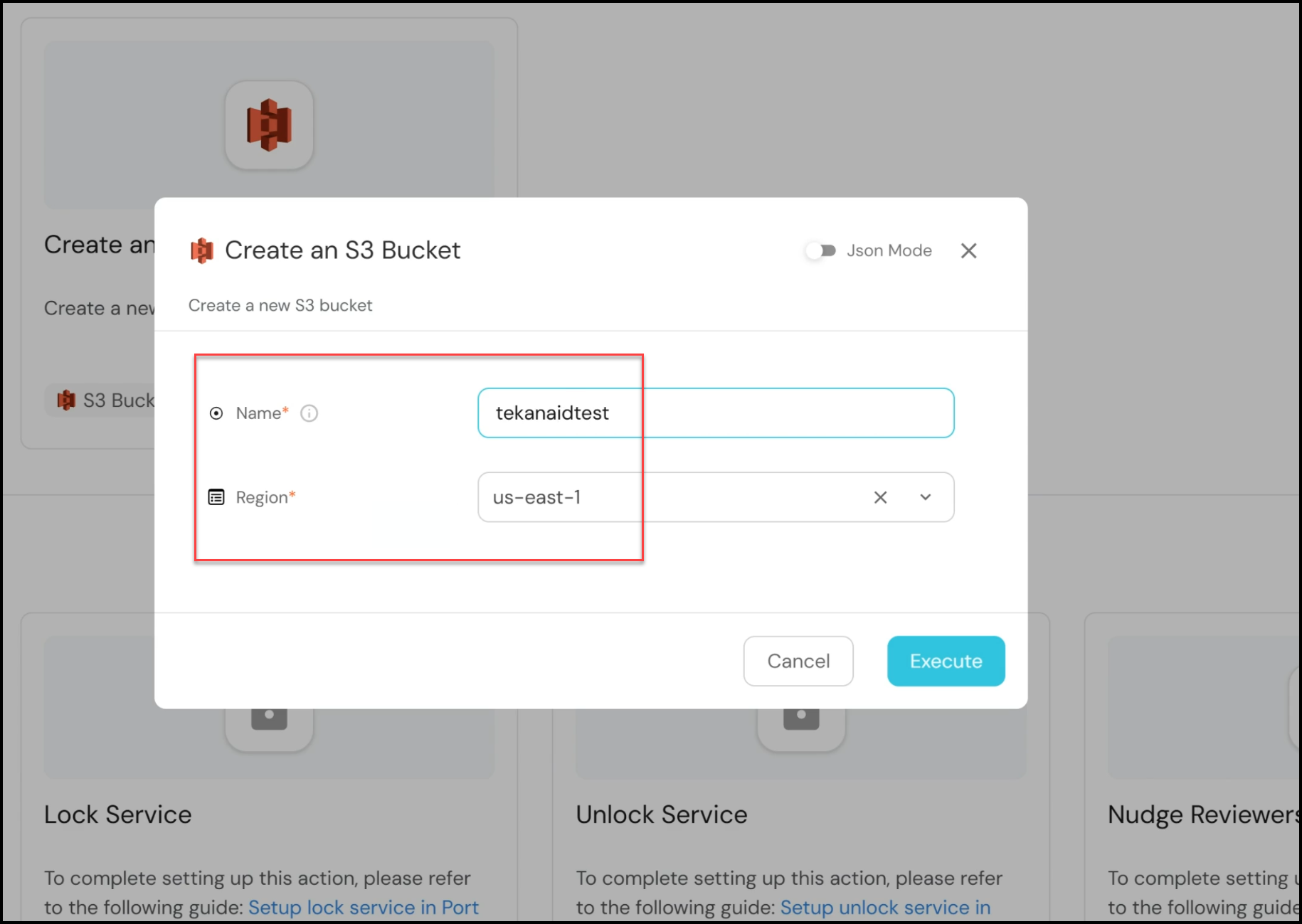
- Initiating the Action: In the Port interface, navigate to the self-service tab and select the “Create an S3 Bucket” action. You’ll be prompted to enter a name for the bucket (e.g., “tekanaidtest”) and select a region (we’ll use “us-east-1” for this demo). After providing the necessary details, click “Execute.”
- Monitoring Execution: Upon execution, the platform triggers a GitHub Actions pipeline. This pipeline is integral to the workflow as it fetches the required secrets from Akeyless, configures the AWS credentials, and runs the Terraform scripts to create the S3 bucket.
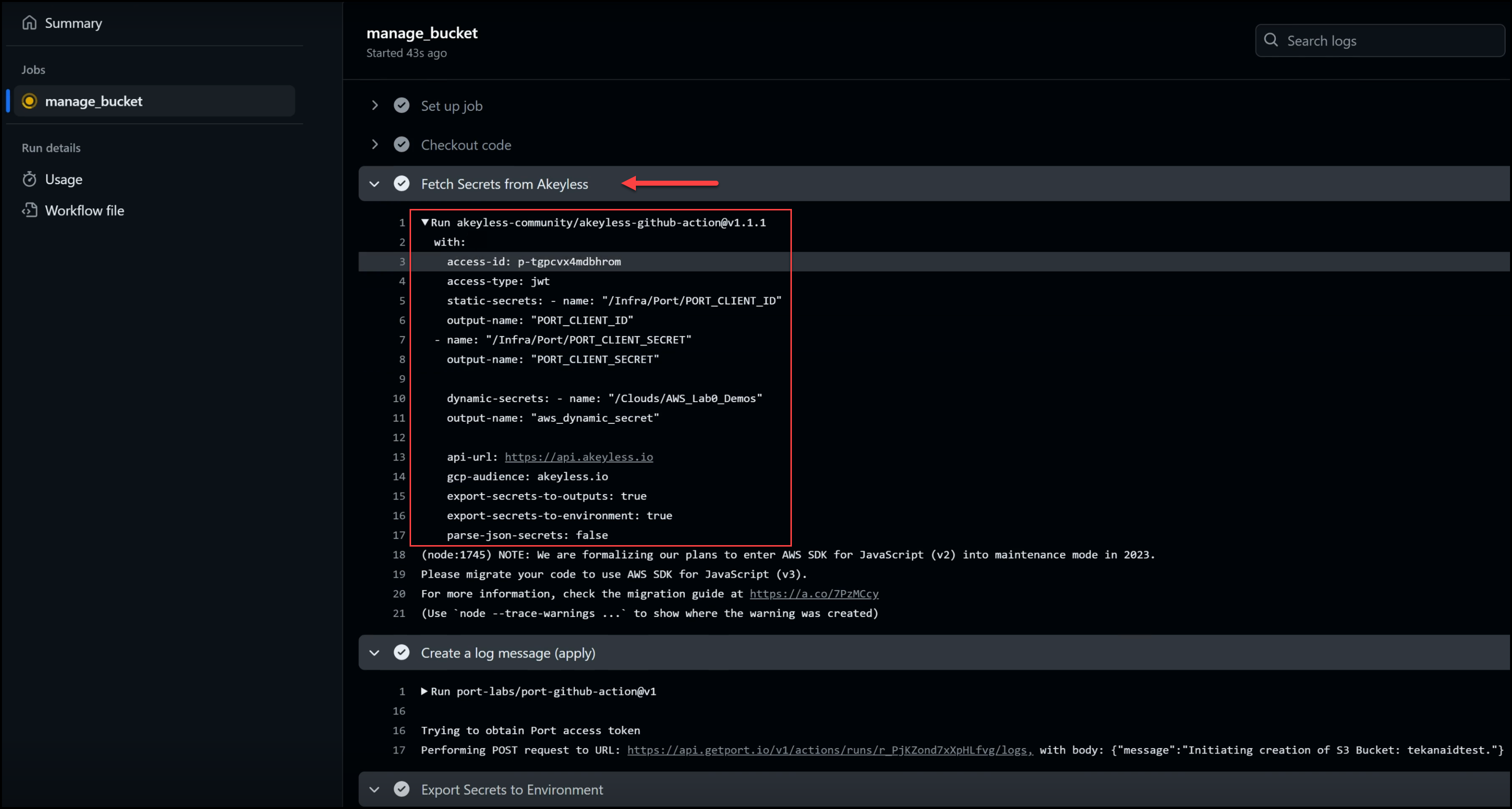
GitHub Actions Pipeline
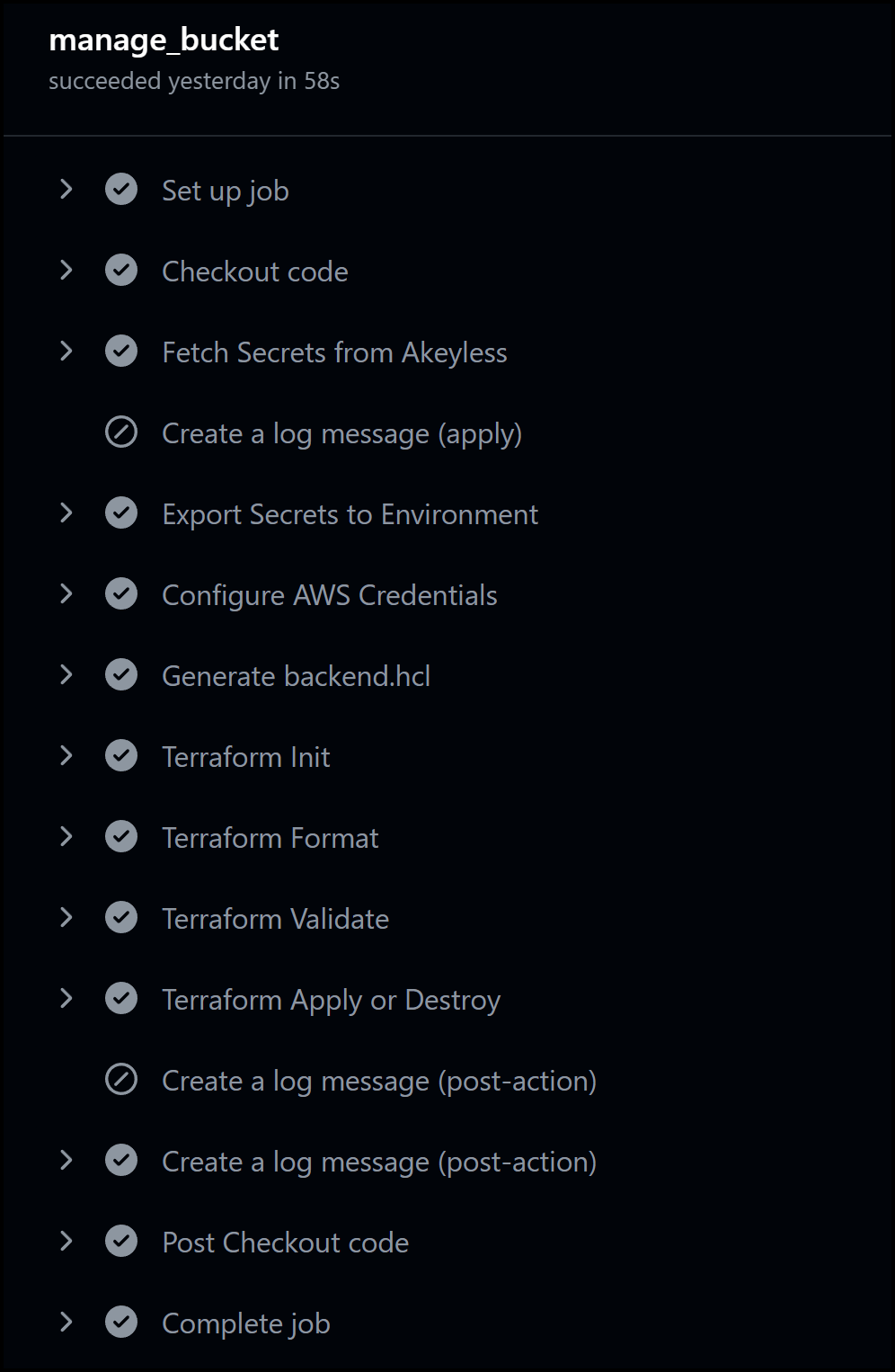
The corresponding GitHub Actions pipeline kicks off once the action is triggered in Port. The pipeline has several key steps, including:
- Fetching Secrets from Akeyless: The pipeline begins by retrieving the necessary secrets from Akeyless, including static secrets (e.g., Port client ID and secret) and dynamic secrets (AWS credentials). These dynamic secrets are created on the fly, ensuring that no long-lived credentials are exposed.
- Executing Terraform: After fetching the secrets, the pipeline moves on to Terraform tasks. Terraform is used to provision the S3 bucket using the dynamically generated AWS credentials. The steps include initializing Terraform, formatting, validating configurations, and applying the changes to create the bucket.
- Logging and Feedback: Throughout the process, the pipeline logs messages back to Port, ensuring that users are kept informed of the progress. For instance, messages such as “Initiating creation of the S3 bucket” and “S3 bucket creation completed” provide real-time feedback.
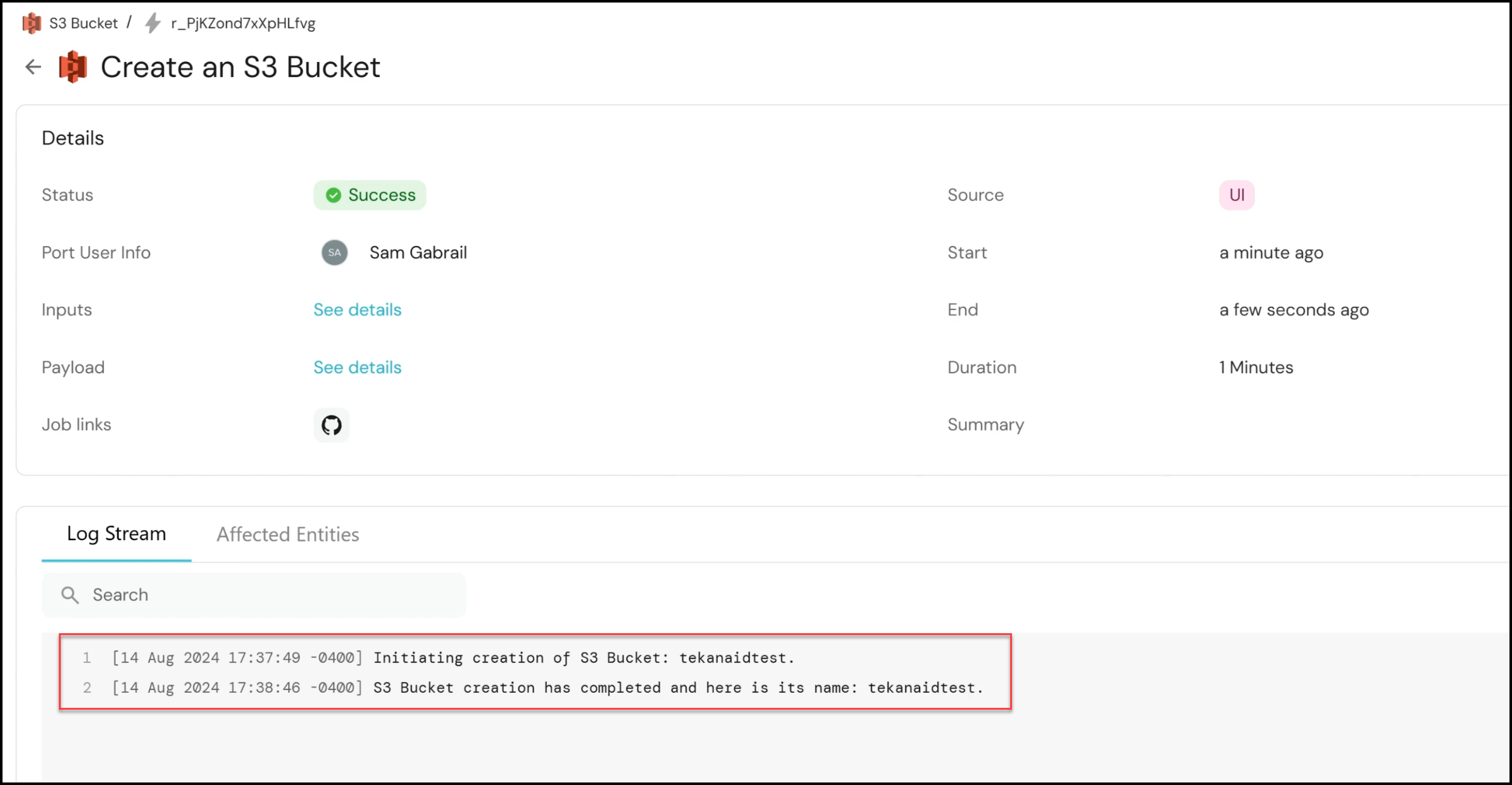
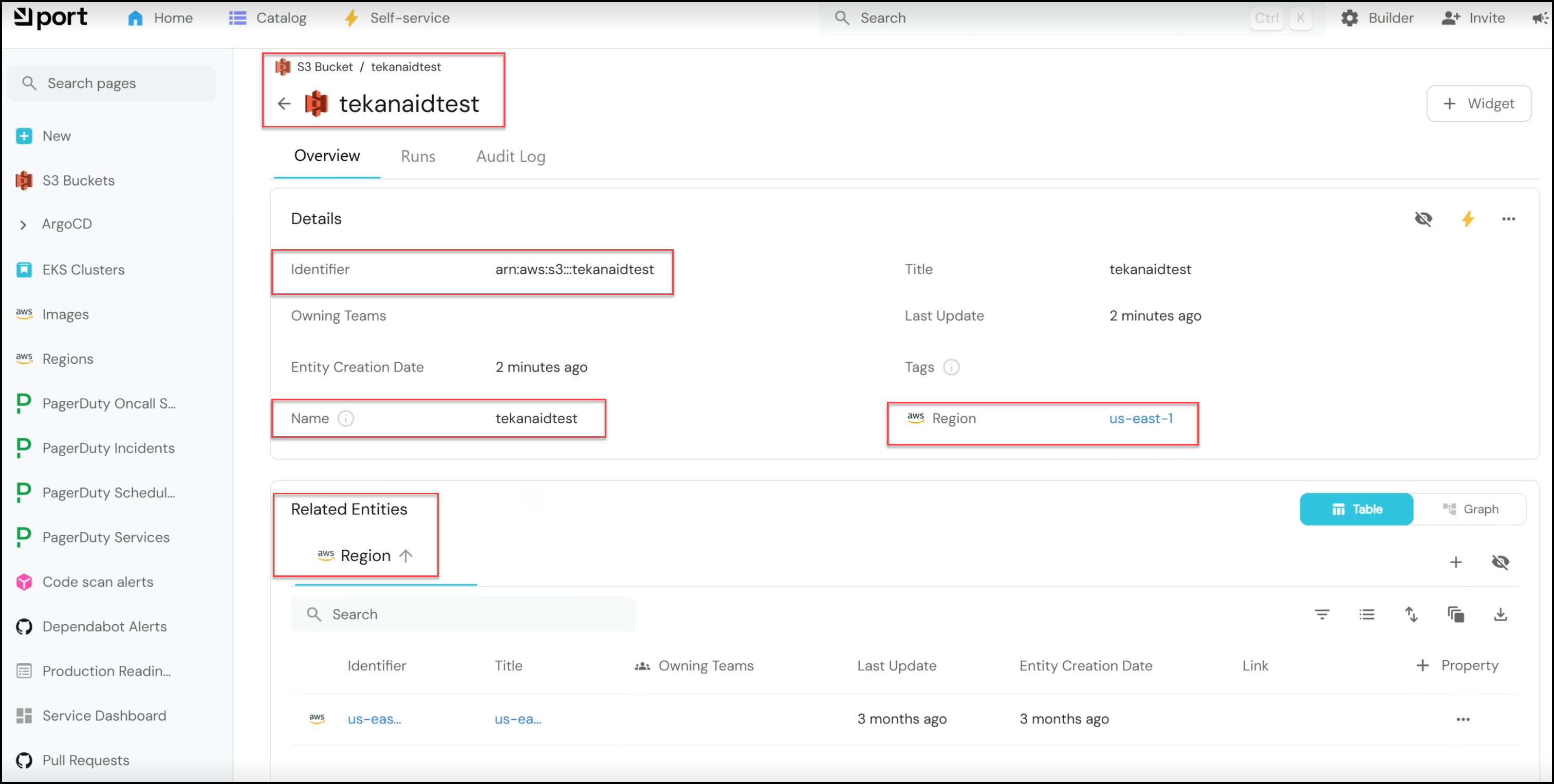
- Reviewing Results: Once the pipeline completes, you can return to the Port interface to see the results. The newly created S3 bucket, named “tekanaidtest,” will appear in the S3 buckets catalog, along with details such as the region and an audit log for tracking.
Below is a snapshot of all the steps in the pipeline:
Below is the full code for the pipeline:
name: Manage S3 Bucket

on:
  workflow_dispatch:
    inputs:
      bucket_name:
        description: "Name of the S3 Bucket"
        required: true
      region:
        description: "AWS Region for the bucket"
        required: true
      action:
        description: "Action to perform (apply/destroy)"
        required: true
        default: "apply"
      port_payload:
        required: true
        description: "Port's payload (who triggered, context, etc...)"
        type: string

jobs:
  manage_bucket:
    permissions:
      id-token: write
      contents: read
    runs-on: ubuntu-latest
    defaults:
      run:
        shell: bash
        working-directory: ./terraform

    if: ${{ github.event.inputs.action == 'apply' || github.event.inputs.action == 'destroy' }}

    steps:
      - name: Checkout code
        uses: actions/checkout@v2

      - name: Fetch Secrets from Akeyless
        id: fetch-akeyless-secrets
        uses: akeyless-community/[email protected]
        with:
          access-id: ${{ vars.AKEYLESS_ACCESS_ID }}
          access-type: jwt
          static-secrets: |
            - name: "/Infra/Port/PORT_CLIENT_ID"
              output-name: "PORT_CLIENT_ID"
            - name: "/Infra/Port/PORT_CLIENT_SECRET"
              output-name: "PORT_CLIENT_SECRET"
          dynamic-secrets: |
            - name: "/Clouds/AWS_Lab0_Demos"
              output-name: "aws_dynamic_secret"

      - name: Create a log message (apply)
        if: ${{ github.event.inputs.action == 'apply' }}
        uses: port-labs/port-github-action@v1
        with:
          clientId: ${{ steps.fetch-akeyless-secrets.outputs.PORT_CLIENT_ID }}
          clientSecret: ${{ steps.fetch-akeyless-secrets.outputs.PORT_CLIENT_SECRET }}
          baseUrl: https://api.getport.io
          operation: PATCH_RUN
          runId: ${{fromJson(inputs.port_payload).context.runId}}
          logMessage: "Initiating creation of S3 Bucket: ${{ inputs.bucket_name }}."

      # Export Dynamic Secret's keys to env vars
      - name: Export Secrets to Environment
        run: |
          echo '${{ steps.fetch-akeyless-secrets.outputs.aws_dynamic_secret }}' | jq -r 'to_entries|map("AWS_\(.key|ascii_upcase)=\(.value|tostring)")|.[]' >> $GITHUB_ENV

      # Setup AWS CLI
      - name: Configure AWS Credentials
        run: |
          env | grep -i aws
          aws configure set aws_access_key_id ${{ env.AWS_ACCESS_KEY_ID }}
          aws configure set aws_secret_access_key ${{ env.AWS_SECRET_ACCESS_KEY }}

      - name: Generate backend.hcl
        run: |
          echo "key = \"workshop1-${GITHUB_ACTOR}/terraform.tfstate\"" > backend.hcl
          sleep 30 # Wait for AWS to assign IAM permissions to the credentials

      - name: Terraform Init
        run: terraform init -backend-config=backend.hcl

      - name: Terraform Format
        run: terraform fmt

      - name: Terraform Validate
        run: terraform validate

      - name: Terraform Apply or Destroy
        run: |
          if [ "${{ github.event.inputs.action }}" == "apply" ]; then
            terraform apply -auto-approve;
          elif [ "${{ github.event.inputs.action }}" == "destroy" ]; then
            terraform destroy -auto-approve;
          fi
        env:
          TF_VAR_bucket_name: ${{ github.event.inputs.bucket_name }}
          TF_VAR_region: ${{ github.event.inputs.region }}
          TF_VAR_port_run_id: ${{ fromJson(inputs.port_payload).context.runId }}

      - name: Create a log message (post-action)
        uses: port-labs/port-github-action@v1
        if: ${{ github.event.inputs.action == 'apply' }}
        with:
          clientId: ${{ steps.fetch-akeyless-secrets.outputs.PORT_CLIENT_ID }}
          clientSecret: ${{ steps.fetch-akeyless-secrets.outputs.PORT_CLIENT_SECRET }}
          baseUrl: https://api.getport.io
          operation: PATCH_RUN
          runId: ${{fromJson(inputs.port_payload).context.runId}}
          logMessage: 'S3 Bucket creation has completed and here is its name: ${{ github.event.inputs.bucket_name }}.'

      - name: Create a log message (post-action)
        uses: port-labs/port-github-action@v1
        if: ${{ github.event.inputs.action == 'destroy' }}
        with:
          clientId: ${{ steps.fetch-akeyless-secrets.outputs.PORT_CLIENT_ID }}
          clientSecret: ${{ steps.fetch-akeyless-secrets.outputs.PORT_CLIENT_SECRET }}
          baseUrl: https://api.getport.io
          operation: PATCH_RUN
          runId: ${{fromJson(inputs.port_payload).context.runId}}
          logMessage: 'S3 Bucket destruction has completed for bucket name: ${{ github.event.inputs.bucket_name }}.'
Destroying the S3 Bucket
The workflow also includes an option to destroy the S3 bucket, which is equally streamlined:
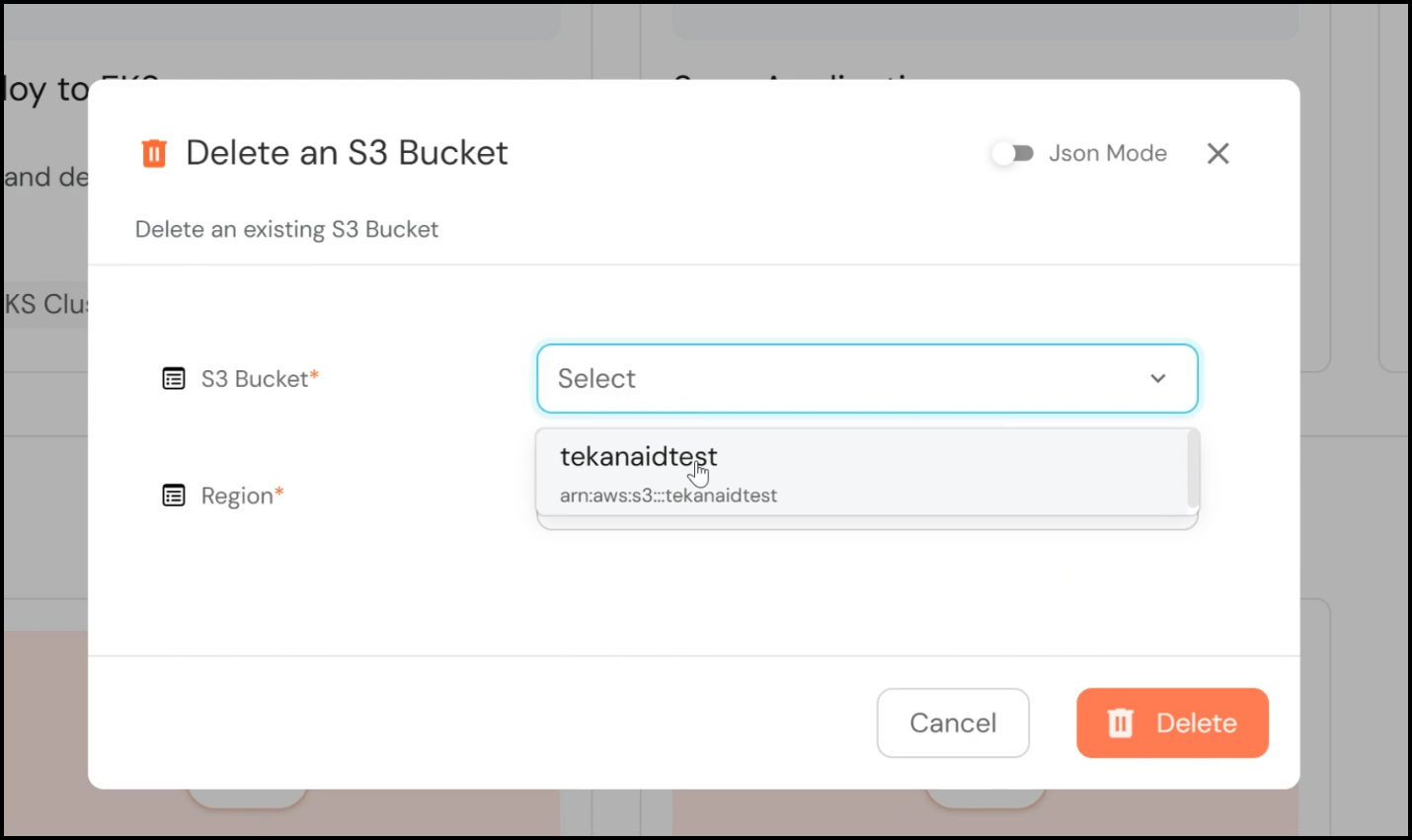
- Initiating Deletion: Navigate to the S3 buckets section in Port and select the bucket you wish to delete. Alternatively, you can use the self-service action “Delete an S3 Bucket,” select the desired bucket, and click “Delete.”
- Pipeline Execution: Similar to the creation process, this triggers a GitHub Actions pipeline. However, this time, the pipeline runs a Terraform destroy action, which decommissions the S3 bucket.
- Confirming Deletion: Once the pipeline completes, you can verify the deletion in the Port interface, where the bucket will no longer appear in the catalog.
Key Benefits of Using Akeyless for Secrets Management
Akeyless plays a critical role in managing and delivering secrets securely within this workflow. Here’s how:
- Dynamic Secrets Management: Akeyless provides dynamic AWS credentials valid for a limited time (e.g., 60 minutes), reducing the risk associated with long-lived credentials.
- GitHub Authentication: To solve the secret zero problem, Akeyless integrates with GitHub to authenticate pipelines using JWT tokens. This eliminates the need for hard-coded secrets in your pipelines, significantly enhancing security.
Configuration in Akeyless
Let’s take a deeper look at how Akeyless is configured to support this workflow.
- Dynamic Secrets Configuration: In Akeyless, dynamic secrets are configured to provide temporary AWS credentials. These credentials include an access key ID and a secret access key, both of which are valid for a specified duration (e.g., 60 minutes).
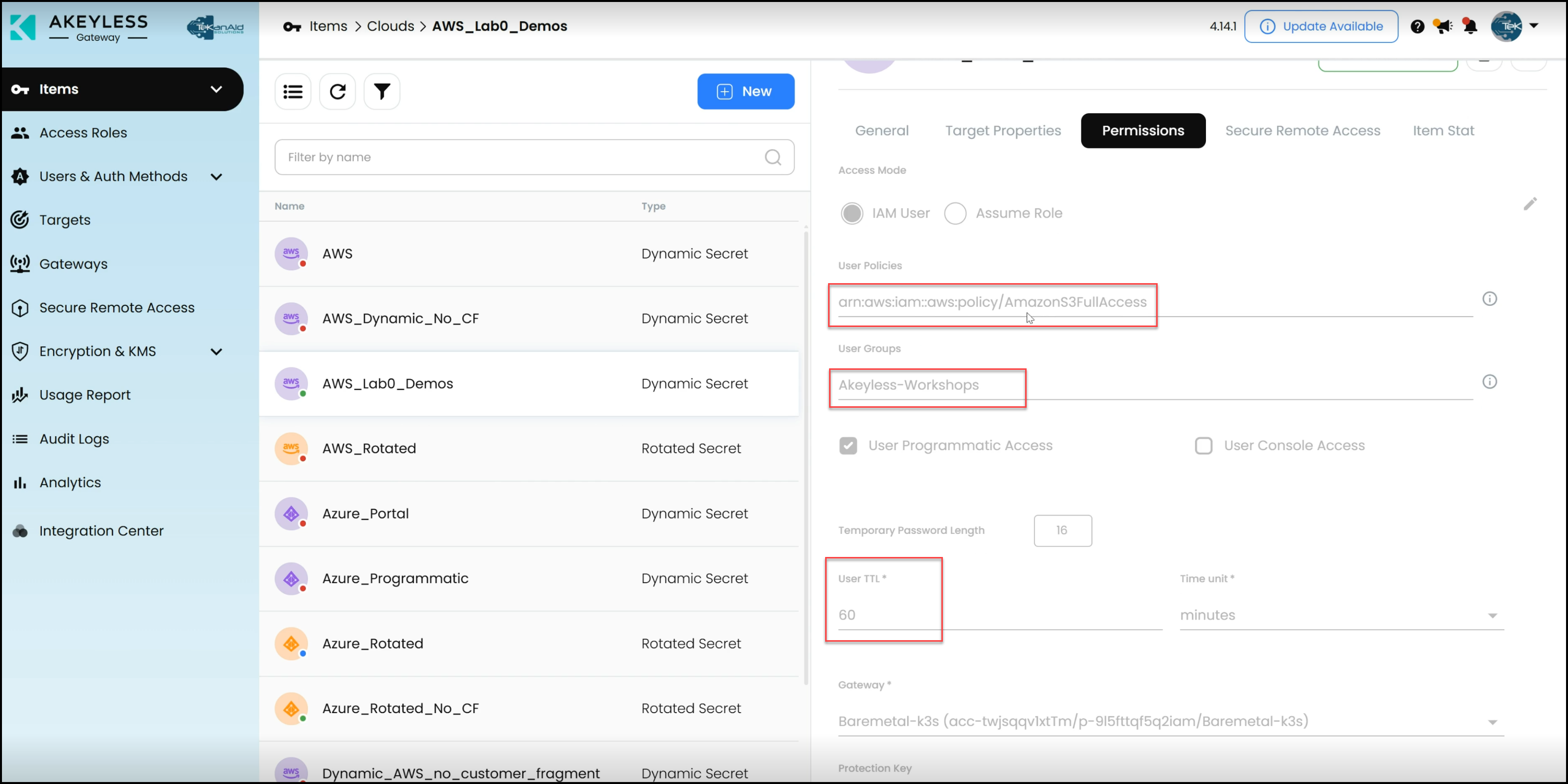
- Target and Permissions: The dynamic secret is linked to a specific target (e.g., an AWS account) with permissions set through a user policy. Additionally, a couple of IAM policies grant full access to Amazon S3, enabling Terraform to manage S3 buckets.
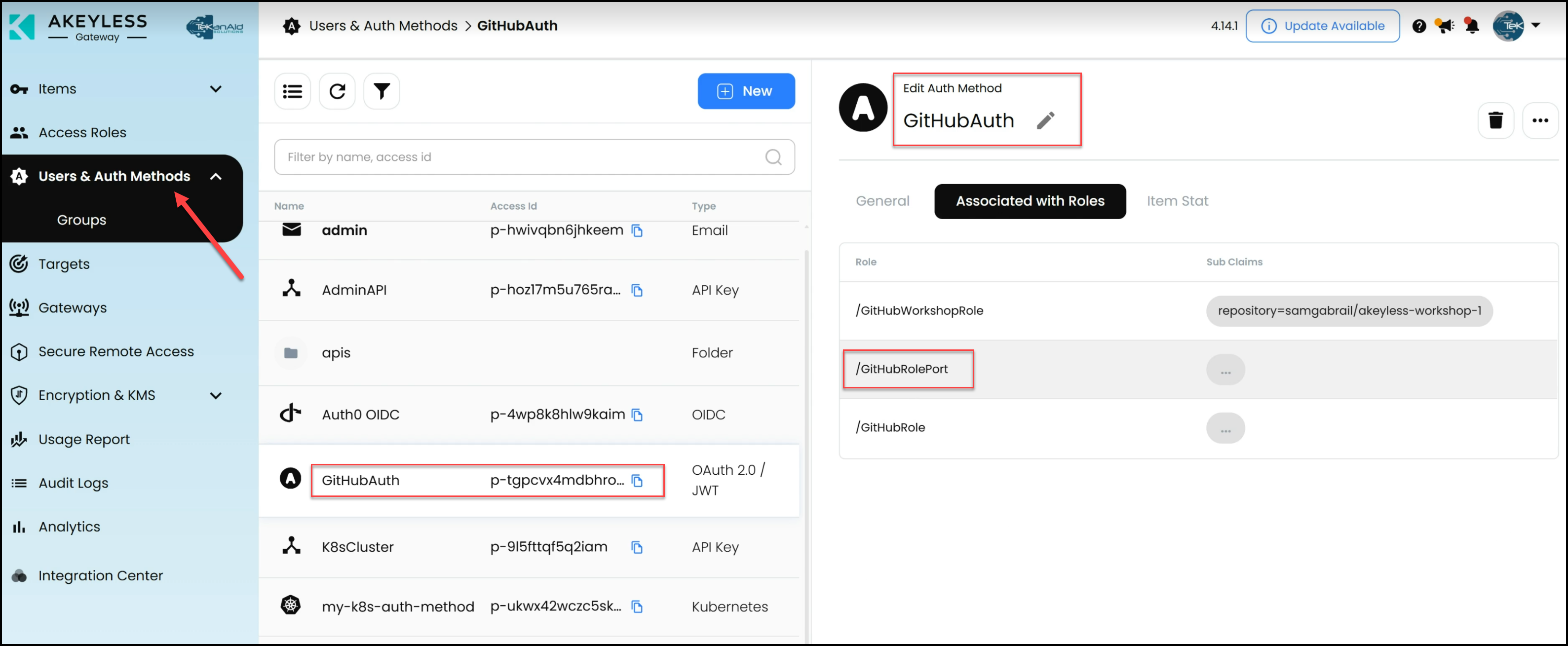
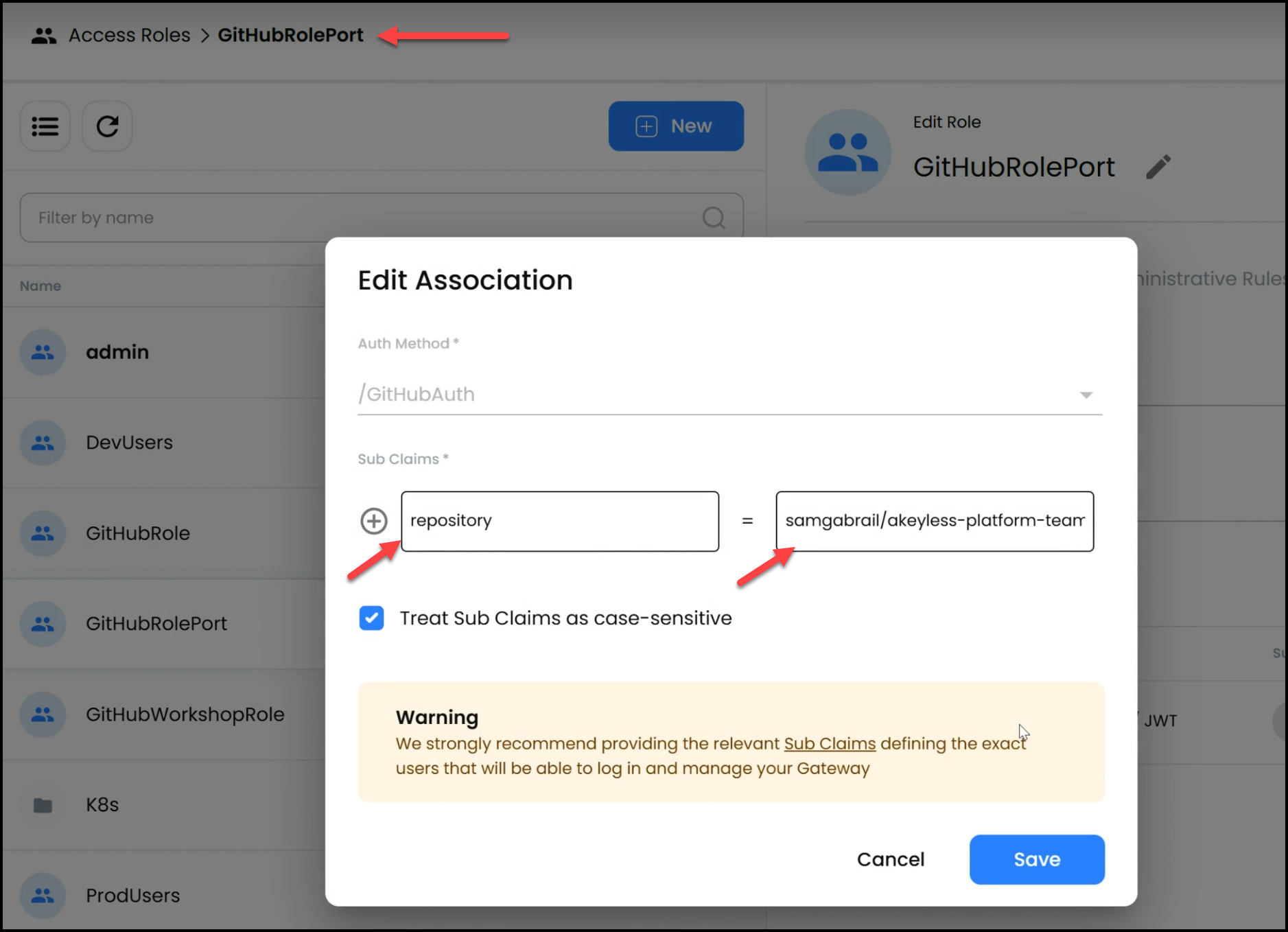
- GitHub Authentication Method: Akeyless uses a GitHub authentication method that allows GitHub Actions to authenticate into Akeyless without requiring hard-coded secrets. This is achieved through a sub-claim for our specific GitHub repository where the Pipeline runs. Therefore, when GitHub presents the JWT token to Akeyless with this sub-claim, Akeyless will check the repository value and allow access.
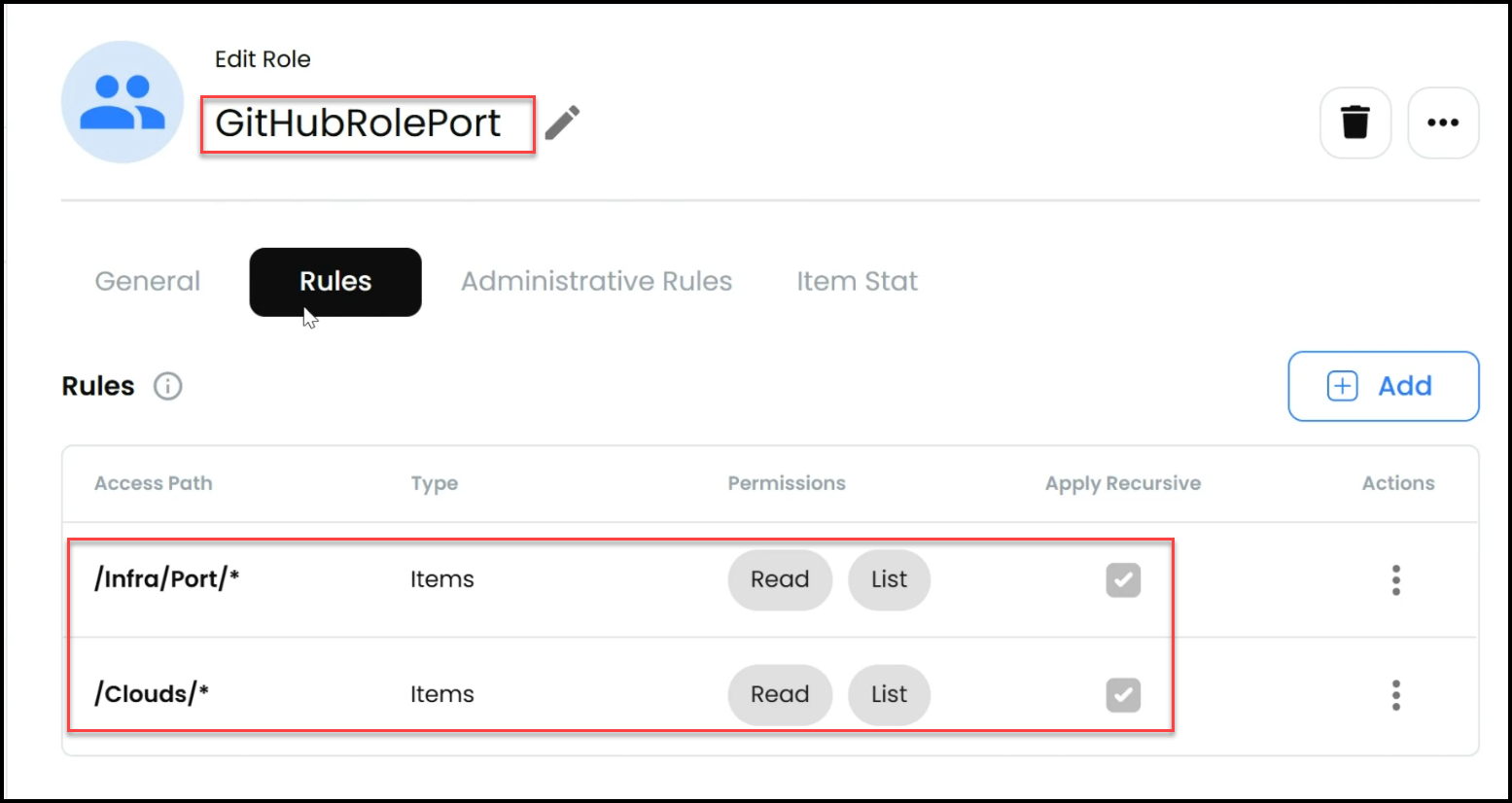
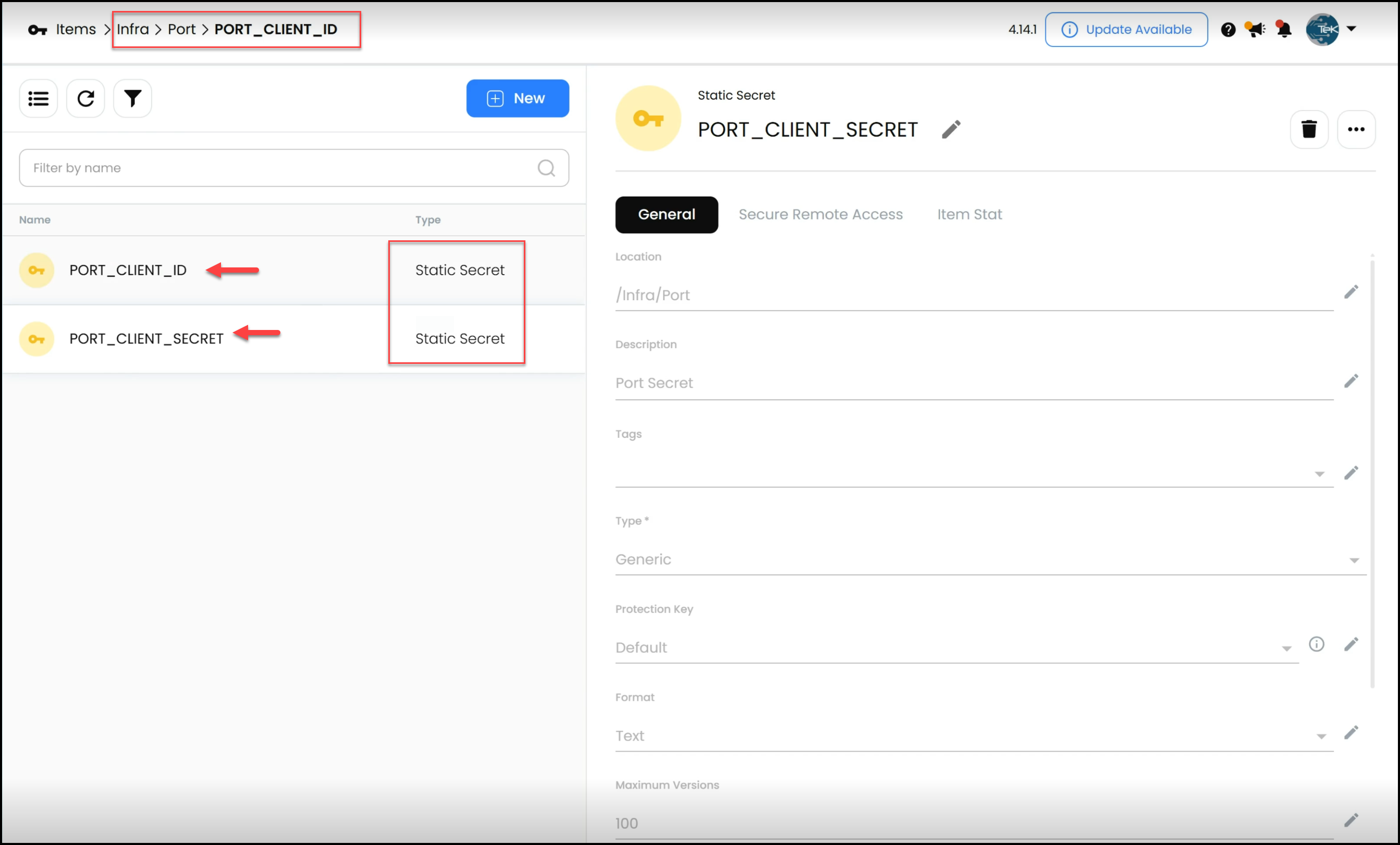
- Static Secrets for Port: The Akeyless configuration also inclueds static secrets, such as the Port client ID and secret, which are necessary for the pipeline to communicate with Port to deliver status messages.
Solving the Secret Zero Problem
A critical security challenge in CI/CD pipelines is the “secret zero” problem, which refers to the initial secret that grants access to other secrets or resources. In this workflow, the problem is elegantly solved by:
- JWT Authentication: GitHub Actions authenticate into Akeyless using a JWT token, which is linked to a specific repository via a sub-claim. This removes the need for storing or hard-coding sensitive credentials in your repository or pipeline.
- Role-Based Access: The role associated with the GitHub Actions pipeline has specific permissions to access the necessary secrets, further securing the workflow.
Conclusion
As platform teams continue to play a pivotal role in modern software development, embracing tools like Akeyless for secrets management is becoming increasingly essential. By integrating Akeyless into their workflows, platform teams can enhance security, streamline processes, and ultimately drive greater efficiency and scalability in their organizations.
The practical demo provided in this guide highlights how these tools work together to create, manage, and destroy an S3 bucket in AWS, all while maintaining the highest security standards. From solving the secret zero problem to dynamically generating AWS credentials, this workflow demonstrates a secure and efficient approach to infrastructure management.
For platform teams looking to enhance their capabilities, Akeyless offers a powerful solution that addresses many of the challenges they face. By leveraging its robust features and integrations, platform teams can ensure that their internal developer platforms are secure, scalable, and ready to meet the demands of modern software development.
Ready to advance your platform engineering skills? Explore Akeyless today and discover how it can transform your approach to secrets management.