June 8, 2026
Posted by Alon Bar
Summary
The Akeyless Identity Security Platform continues to expand its workforce identity capabilities with major enhancements to Akeyless Password Manager, including a new native desktop application for Windows and macOS and a fully revamped Web Console.
As part of the broader platform that secures human, machine, and AI agent identities, Akeyless Password Manager now delivers a consistent experience across every surface users rely on today: browser, mobile, web console, and desktop. One Password Manager, one security model, one experience everywhere people work.
The update brings a faster user experience, easier migrations, folder management, upgraded Favorites, and one-click launch and autofill with the Akeyless browser extension.
A Platform Built for the AI-Driven Identity Era
Identity is no longer centered only on people. Modern enterprises now rely on machines, workloads, automation platforms, service accounts, and AI agents that authenticate, retrieve data, and trigger actions at machine speed.
This shift creates a new identity security challenge: organizations must govern not only who or what gets access, but also how that access is used in real time.
The Akeyless Identity Security Platform was built for this reality. It unifies secrets management, encryption and key management, privileged access management (PAM), certificate lifecycle management, password management, and identity governance under one Zero-Knowledge platform.
At the foundation is Akeyless Distributed Fragments Cryptography™ (DFC™), which ensures sensitive material is never assembled in one place and cannot be read by Akeyless. This enables enterprises to centralize control without centralizing trust.
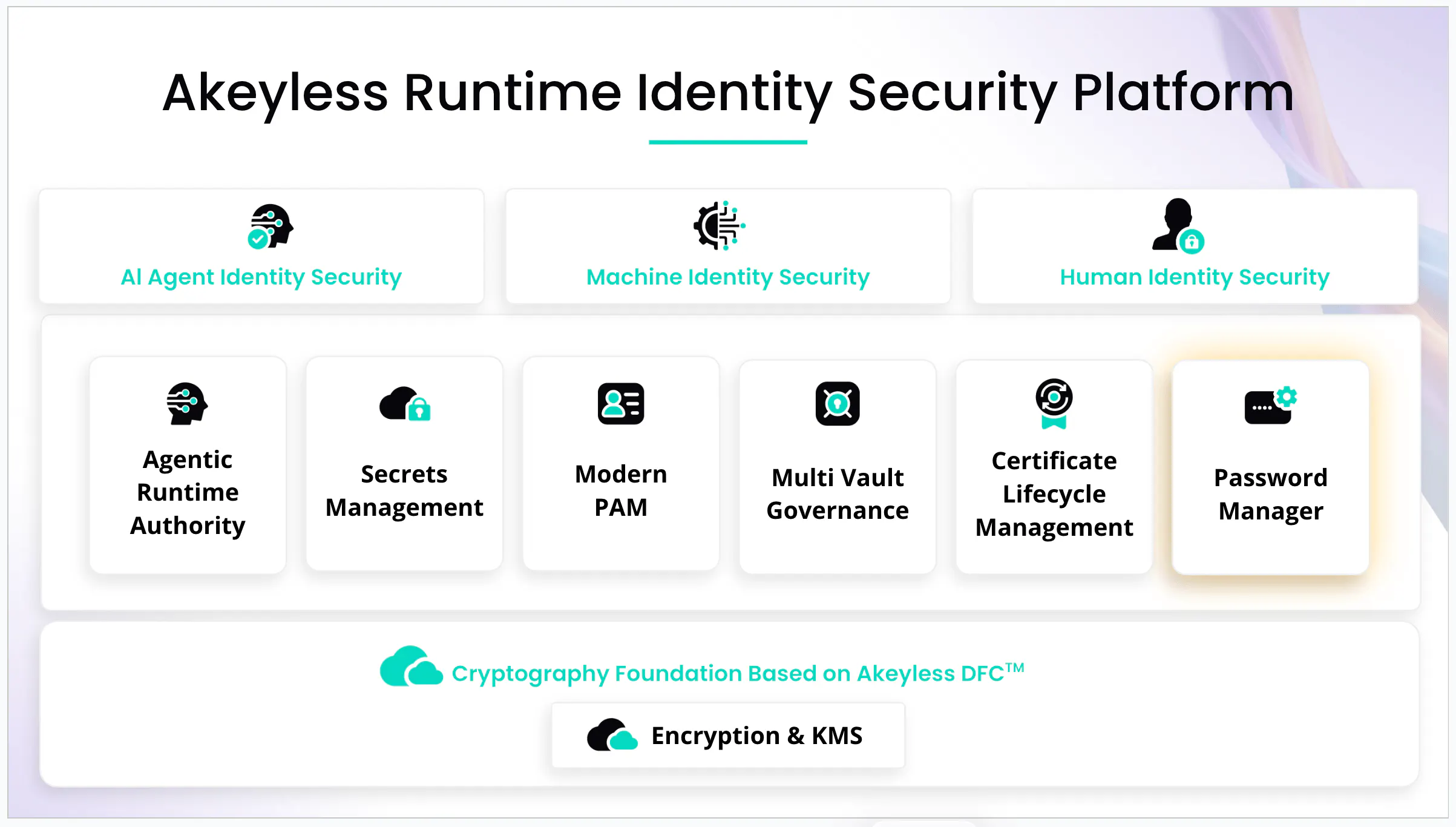
Within this platform, Password Manager serves as the workforce-facing layer: the place where users securely access passwords, passkeys, shared credentials, and secrets, while admins enforce the same enterprise governance model used across machines, workloads, and privileged access.
While Akeyless secures AI agents, machines, workloads, and privileged users across runtime environments, Password Manager delivers the workforce-facing experience that brings the same identity security principles to everyday credentials. Whether users access passwords from a browser extension, mobile device, web console, or desktop application, they operate within the same governance, audit, and Zero-Knowledge framework.
This platform-first approach is what makes Akeyless Password Manager fundamentally different from standalone password management solutions.
Why Akeyless Password Manager Is Different
Most password managers were designed for consumers and later adapted for enterprises.
Recent research into Microsoft Edge’s built-in password manager highlighted the risks that can emerge when credential storage is optimized primarily for convenience. As password managers increasingly hold access to critical business systems, credential security has become an identity security challenge, not just a productivity feature.
Akeyless starts from the opposite direction. Akeyless Password Manager is built into the same platform enterprises already use to protect secrets, keys, certificates, privileged access, and machine identities. That means password management is governed by the same identity, policy, audit, and Zero-Knowledge security model as the rest of the environment.
With Akeyless Password Manager, organizations can:
- Manage passwords, passkeys, static secrets, dynamic secrets, and rotated secrets in one place.
- Separate personal and corporate credentials.
- Enforce RBAC and ABAC-based access controls.
- Stream audit logs to SIEM and compliance tools.
- Support SAML, OIDC, Google, GitHub, Access ID, and Alias authentication, with MFA enforced through the organization’s identity provider rather than maintained separately inside the password manager.
- Apply Zero-Knowledge protection through DFC™.
Authentication and MFA policies remain centralized within the organization’s identity provider, helping security teams maintain a single authentication policy across all enterprise applications rather than managing separate MFA controls inside the password manager.
This matters because enterprise password management is not just about storing credentials. It is about reducing credential risk, improving audit readiness, and bringing workforce passwords into the broader identity security strategy.
What’s New in Akeyless Password Manager
Native Desktop App for Windows and macOS
The new Akeyless Password Manager Desktop App gives users a dedicated desktop experience for password management. Users can search, copy, reveal, generate, and organize credentials without opening a browser tab.
Together with the Akeyless browser extension, the desktop app becomes more than a vault. Users can launch saved websites, automatically inject usernames and passwords, and include TOTP (Time-Based One-Time Password) one-time codes when authenticator secrets are stored with the item. The same secure handoff mechanism powers launch and autofill workflows across both the desktop application and the web console, creating a seamless experience across every surface.
This release completes the Akeyless Password Manager footprint: browser, mobile, web console, and now desktop. Users can access their credentials wherever they work without changing tools or security models.
This is especially useful when credentials are needed outside the browser, such as for VPN clients, RDP sessions, terminal tools, thick-client apps, or internal desktop applications.
Revamped Web Console
The new Web Console delivers a cleaner, faster, and more intuitive password management experience.
Key improvements include:
- Cleaner layout with faster navigation.
- Personal, Corporate, and Favorites views.
- List and grid views.
- Smoother create and edit flows.
- Password strength guidance.
- Inline breach awareness.
- Better folder management.
- Upgraded Favorites.
The console now functions as a full browser-based password management experience and becomes even more powerful when paired with the Akeyless browser extension.
The console includes a collapsible sidebar and quick switching between Personal, Corporate, and Favorites views. Users can choose between list and grid views, with sorting and filtering controls always within reach for managing large collections of credentials.
Password creation and editing workflows have also been streamlined, with improved password-strength guidance and inline breach-awareness notifications when users create or update credentials.
Easier Migration
Akeyless now supports guided CSV import from 1Password, LastPass, Bitwarden, Dashlane, Keeper, Google Password Manager, Apple Passwords, and generic CSV formats.
For larger migrations, Akeyless Automatic Migration supports phased cutovers, helping teams move without locking users out or requiring a big-bang migration.
Better Organization at Scale
Folder management now supports nested folders and structured organization across personal and corporate credentials. Teams can organize passwords using paths that reflect how they actually work, scaling from dozens of credentials to thousands without creating a flat, difficult-to-manage vault structure.
Favorites now follow users across both the desktop app and the web console, ensuring frequently used credentials remain instantly accessible regardless of where users sign in.
Same Zero-Knowledge Foundation
The new desktop app and console do not change the security model. Akeyless Password Manager continues to run on the same Zero-Knowledge platform powered by DFC™, meaning Akeyless cannot read customer passwords, not by policy, but by cryptographic design.
Launch, Sign In, and Fill Directly from the Console
With the Akeyless browser extension installed, the Web Console becomes a launchpad for day-to-day credential workflows.
Users can:
- Launch saved websites directly from the console.
- Automatically inject usernames and passwords into login forms.
- Include TOTP one-time codes when authenticator secrets are stored with the credential.
- Access both personal and corporate credentials through the same workflow.
The console uses the same secure handoff mechanism as the desktop application, providing a consistent launch and autofill experience across all interfaces.
Enterprise-Grade Sign-In Experience
Organizations that deploy preconfigured browser extensions can simplify onboarding and authentication even further. With preconfigured tenant settings, users are presented with a “Ready to Sign In” experience and are automatically routed to the appropriate authentication provider without manually selecting authentication methods or entering tenant information.
Supported authentication methods include SAML, OIDC, Alias, OAuth, Google, GitHub, Email, and Access ID-based authentication. This streamlined experience reduces friction for end users, accelerates deployment, and helps organizations maintain a consistent authentication experience across the enterprise.
See Akeyless Password Manager in Action
Akeyless Password Manager brings workforce credentials into the same platform that secures secrets, machine identities, privileged access, certificates, and encryption keys.
With the new desktop app and revamped console, users get a better daily experience, while security teams get the governance, auditability, and Zero-Knowledge protection they need.
Ready to see it in action?
Request a demo of Akeyless Password Manager.
Frequently Asked Questions
What is Akeyless Password Manager?
Akeyless Password Manager is the workforce password management capability within the Akeyless Identity Security Platform. It enables secure management of passwords, passkeys, secrets, and shared credentials across browser, desktop, mobile, and web console experiences.
Is Akeyless Password Manager a standalone product?
No. It is part of the Akeyless Identity Security Platform, alongside secrets management, encryption and key management, certificate lifecycle management, privileged access, and machine and AI identity security.
What is new in this release?
This release introduces a native desktop app for Windows and macOS, plus a fully revamped Web Console with improved UX, automatic migrations, folder management, upgraded Favorites, and better launch and autofill workflows.
Does Akeyless have access to customer passwords?
No. Akeyless uses Zero-Knowledge security powered by Distributed Fragments Cryptography™. Akeyless cannot read or reconstruct customer passwords.
Does it support migration from other password managers?
Yes. Akeyless supports guided import from leading password managers including 1Password, LastPass, Bitwarden, Dashlane, Keeper, Google Password Manager, and Apple Passwords.
Does the desktop app support autofill?
The desktop app works with the Akeyless browser extension to support one-click launch and autofill, including TOTP codes when stored with the item.
Can enterprises separate personal and corporate credentials?
Yes. Akeyless supports separation between personal and corporate items, with policy controls for enterprise governance.