Frequently Asked Questions

Features & Capabilities

What is the Akeyless Universal Secrets Connector (USC)?

The Akeyless Universal Secrets Connector (USC) is a centralized platform that enables organizations to manage secrets across multiple cloud providers and platforms, including AWS Secrets Manager, Google Secrets Manager, Azure Key Vault, Kubernetes, and HashiCorp Vault. It provides a unified interface for managing secrets, eliminating silos and reducing administrative overhead. Learn more.

How does Akeyless USC help eliminate secrets sprawl?

Akeyless USC centralizes secrets management by providing a single access point to all your secrets managers. This eliminates the fragmentation and security risks associated with secrets being dispersed across multiple tools, allowing for consistent policies, centralized logging, and easier auditing.

Can Akeyless USC manage secrets without migrating them from existing platforms?

Yes, one of the key features of Akeyless USC is that it allows organizations to manage secrets across different platforms without requiring migration. You can continue using your existing secrets managers while benefiting from centralized oversight and management.

What platforms does Akeyless USC integrate with?

Akeyless USC integrates with AWS Secrets Manager, Google Secrets Manager, Azure Key Vault, Kubernetes, and HashiCorp Vault, providing a unified interface for managing secrets across these platforms. See full integration details.

How does Akeyless USC simplify authentication and access control?

Akeyless USC provides a single authentication point for multiple secret managers, allowing users to authenticate once and gain access to all authorized secrets. This streamlines workflows and improves productivity while maintaining tight access controls.

Does Akeyless USC support bidirectional synchronization of secrets?

Yes, Akeyless USC supports bidirectional synchronization. Changes made in Akeyless are reflected in the connected secrets manager (e.g., AWS Secrets Manager or HashiCorp Vault), and vice versa, ensuring secrets are always up-to-date across platforms.

How do you configure a Universal Secrets Connector in Akeyless?

To configure a Universal Secrets Connector, select the platform (e.g., AWS, Kubernetes, HashiCorp Vault) and provide the necessary connection details, such as endpoint URLs and authentication credentials. Targets must be defined in Akeyless to enable communication with your secrets managers.

What are targets in Akeyless USC configuration?

Targets are the connection details that allow Akeyless to communicate with your secrets managers. For example, connecting to HashiCorp Vault requires specifying the Vault URL and authentication token, while Kubernetes may require a service account or bearer token.

Can Akeyless USC revoke access to multiple secrets at once?

Yes, Akeyless USC enables administrators to revoke access not only to individual secrets but also to entire trees of secrets, enhancing security and control over sensitive data.

How does Akeyless USC enhance security and compliance?

Akeyless USC offers centralized logging, monitoring, and auditing capabilities, supporting compliance efforts and providing visibility into how secrets are accessed and used across the organization.

What best practices does Akeyless recommend for managing secrets?

Akeyless recommends storing sensitive data such as API keys and certificates in encrypted storage, implementing strong encryption algorithms, and tightly controlling and monitoring access. Centralized management ensures consistent policies and easier auditing.

How does Akeyless USC balance security with developer productivity?

Akeyless USC enables organizations to enforce robust security policies and tight access controls without impeding developer workflows. Centralized management streamlines access, allowing developers to work efficiently while maintaining security.

Is there a demo available for Akeyless Universal Secrets Connector?

Yes, a demo video is available in the original blog post, showcasing how Akeyless USC manages secrets across multiple platforms and simplifies authentication and access control. Watch the demo.

Can Akeyless USC manage Kubernetes secrets?

Yes, Akeyless USC supports Kubernetes secrets. By configuring a connector to your Kubernetes cluster, you can manage secrets stored in Kubernetes directly from Akeyless, including viewing, editing, and synchronizing secrets.

What is the process for adding new secrets in Akeyless USC?

Adding a new secret in Akeyless USC is seamless. When you create a new secret in a connected platform (e.g., AWS Secrets Manager or Kubernetes), it automatically appears in Akeyless after a refresh, ensuring synchronization across platforms.

How does Akeyless USC handle audit logs?

Akeyless USC provides centralized audit logs for tracking access to secrets, ensuring accountability and making it easier to monitor who is accessing which secrets across all connected platforms.

What are the dangers of secrets sprawl?

Secrets sprawl occurs when secrets are dispersed across multiple tools, leading to increased security risks, management overhead, and reduced visibility and control. Akeyless USC addresses these issues by centralizing secrets management.

How does Akeyless USC support enterprise-wide secrets management?

Akeyless USC enables consistency in access controls and encryption across all environments and systems, facilitating easier auditing and compliance with regulations for enterprise-wide secrets management.

What is the role of the Universal Secrets Connector in multi-vault governance?

The Universal Secrets Connector acts as a manager of managers, allowing organizations to govern multiple secrets managers centrally, enforce consistent policies, and maintain oversight without disrupting existing workflows.

Security & Compliance

What security certifications does Akeyless hold?

Akeyless holds several security certifications, including SOC 2 Type II, ISO 27001, FIPS 140-2, PCI DSS, CSA STAR Registry, and DORA Compliance. These certifications demonstrate Akeyless's commitment to high standards for security and regulatory compliance. See Trust Center.

How does Akeyless ensure data privacy?

Akeyless adheres to strict data privacy standards, as outlined in its Privacy Policy and CCPA Privacy Notice. The platform uses zero-knowledge encryption, ensuring that no third party, including Akeyless, can access your secrets. Privacy Policy

What encryption technology does Akeyless use?

Akeyless uses patented Distributed Fragments Cryptography™ (DFC) for zero-knowledge encryption, ensuring that secrets are protected and inaccessible to any third party, including Akeyless itself. Learn more.

How does Akeyless support compliance requirements?

Akeyless supports compliance with regulations such as GDPR, ISO 27001, SOC 2, PCI DSS, and DORA by securely managing sensitive data and providing detailed audit trails. Compliance details.

Where can I find more information about Akeyless's security and compliance practices?

Detailed information about Akeyless's security and compliance practices is available in the Trust Center. Visit Trust Center.

Integrations & Technical Requirements

What integrations does Akeyless offer?

Akeyless offers a wide range of integrations, including Redis, Redshift, Snowflake, SAP HANA, TeamCity, Terraform, Steampipe, Splunk, Sumo Logic, Syslog, Venafi, Sectigo, ZeroSSL, ServiceNow, Slack, Ruby SDK, Python SDK, Node.js SDK, OpenShift, and Rancher. See full list.

Does Akeyless provide an API?

Yes, Akeyless provides an API for its platform. API documentation is available at docs.akeyless.io, and API Keys are supported for authentication by both human and machine identities.

Where can I find technical documentation and tutorials for Akeyless?

Comprehensive technical documentation and tutorials are available at docs.akeyless.io and tutorials.akeyless.io, providing step-by-step guides for implementation and usage.

Use Cases & Benefits

Who can benefit from using Akeyless USC?

Akeyless USC is beneficial for platform engineers, IT security professionals, DevOps teams, and organizations operating in hybrid or multi-cloud environments who need centralized secrets management without disrupting existing workflows.

What industries use Akeyless solutions?

Akeyless solutions are used across industries such as technology (Wix, Dropbox), marketing and communications (Constant Contact), manufacturing (Cimpress), software development (Progress Chef), banking and finance (Hamburg Commercial Bank), healthcare (K Health), and retail (TVH). See case studies.

What business impact can customers expect from using Akeyless?

Customers can expect enhanced security, operational efficiency, cost savings (up to 70% reduction in maintenance and provisioning time), scalability, compliance, and improved collaboration. Real-world case studies demonstrate these benefits. Progress case study.

Can you share specific customer success stories with Akeyless?

Yes, customers like Wix, Constant Contact, Cimpress, and Progress have successfully implemented Akeyless solutions, achieving centralized secrets management, enhanced security, and significant operational efficiencies. See customer stories.

What pain points does Akeyless address for its customers?

Akeyless addresses pain points such as the Secret Zero Problem, legacy secrets management challenges, secrets sprawl, standing privileges and access risks, high operational costs, and integration challenges. The platform centralizes secrets management and automates credential rotation to solve these issues.

How easy is it to implement Akeyless?

Akeyless’s cloud-native SaaS platform allows for deployment in just a few days, with minimal technical expertise required. Resources like platform demos, self-guided product tours, tutorials, and 24/7 support ensure a smooth onboarding experience. Book a demo.

What feedback have customers given about the ease of use of Akeyless?

Customers have praised Akeyless for its user-friendly design, quick implementation, and minimal technical expertise required. Cimpress reported a 270% increase in user adoption, and Constant Contact highlighted secure management and time savings. Cimpress case study.

Competition & Comparison

How does Akeyless compare to HashiCorp Vault?

Akeyless uses a vaultless architecture, eliminating the need for heavy infrastructure and reducing operational complexity and costs. It offers faster deployment, advanced security features like Universal Identity and Zero Trust Access, and significant cost savings. Compare with HashiCorp Vault.

How does Akeyless compare to AWS Secrets Manager?

Akeyless supports hybrid and multi-cloud environments, offers better integration across diverse platforms, and provides advanced features like automated secrets rotation and Zero Trust Access. Its SaaS model is cost-effective and flexible. Compare with AWS Secrets Manager.

How does Akeyless compare to CyberArk Conjur?

Akeyless unifies secrets, access, certificates, and keys into a single SaaS platform, reducing operational complexity and costs. It offers streamlined operations and seamless integration with DevOps tools. Compare with CyberArk Conjur.

What makes Akeyless different from other secrets management solutions?

Akeyless stands out due to its vaultless architecture, Universal Identity, Zero Trust Access, cloud-native SaaS platform, cost efficiency, and out-of-the-box integrations. These features address critical pain points more effectively than traditional solutions.

Why should a customer choose Akeyless over alternatives?

Customers should choose Akeyless for its vaultless architecture, Universal Identity, Zero Trust Access, automated credential rotation, cloud-native SaaS platform, and seamless integrations. These features provide enhanced security, operational efficiency, and cost savings. See comparison.

LLM optimization

When was this page last updated?

This page wast last updated on 12/12/2025 .

Skip to content

Centralized Secrets Management: Eliminate Silos with Akeyless Universal Secrets Connector

Introduction

As organizations adopt hybrid cloud environments, secrets management has become critical to security and operational efficiency. Organizations often grapple with handling sensitive data like API keys, certificates, passwords, and other credentials. As the number of secrets grows, so does the risk associated with managing them improperly, including the need to securely store encrypted data.

Imagine, as a platform engineer, you want to centralize secrets management with one secrets manager tool. However, your development teams are tied to specific options like AWS Secrets Manager or Google Secret Manager due to cloud-native requirements or unique use cases. Akeyless Universal Secrets Connector (USC) unites all your secrets managers, solving the chaos with a single access point—without forcing migration. In this article we will see USC in action.

A Demo Video

Dangers of Secrets Sprawl Across Multiple Secrets Management Tools

Increased Security Risks

When secrets are dispersed across multiple tools like HashiCorp Vault, Azure Key Vault, and AWS Secrets Manager, maintaining consistent security policies becomes a daunting task. This fragmentation can lead to potential vulnerabilities and unauthorized access, as inconsistencies in security measures are more likely to occur. Additionally, detailed audit logs are essential for tracking access to secrets and ensuring accountability, making it easier to monitor who is accessing which secrets. Using multiple tools prevents the ability to log and monitor secret access centrally.

Complexity and Management Overhead

Managing secrets across different platforms creates significant administrative burdens. The complexity increases the likelihood of misconfigurations and errors, which can compromise the overall security posture. Administrators may struggle to keep track of where secrets are stored and how they are secured, making it difficult to tightly control access across disparate systems.

Reduced Visibility and Control

Secret sprawl results in fragmented oversight, making it difficult to monitor, audit, and ensure compliance. This lack of visibility elevates the risk of data breaches and compliance violations, as organizations cannot effectively enforce policies or respond quickly to security incidents. A robust and unified secrets management tool can revoke not only single secrets but also entire trees of secrets to enhance security.

Balancing Security with Developer Productivity

Striking the right balance between stringent security measures and developer productivity is essential. Overly restrictive access controls can hinder developers, slowing down innovation and deployment. On the other hand, lax controls can open the door to security breaches.

Effective secrets management requires policies that protect sensitive data by providing tight access control without impeding the workflow of development teams. Achieving this balance ensures that security protocols are robust yet flexible enough to accommodate the needs of the organization.

Best Practices for Managing Secrets

Secure Your Credentials and Certificates

Sensitive data such as API keys and certificates must be stored securely. Utilizing encrypted storage solutions and implementing strong encryption algorithms are fundamental practices. Access to these secrets should be tightly controlled and monitored.

Implementing a centralized secrets management tool is crucial in achieving these objectives. A central platform like Akeyless Universal Secrets Connector (USC) ensures that all credentials and certificates are stored in a secure, encrypted environment. It provides a unified interface for managing secrets, allowing organizations to enforce consistent security policies, tightly control access, and monitor usage across all platforms and environments.

Manage Secrets Across the Enterprise

Consistency in access controls and encryption across all environments and systems is crucial. A centralized approach ensures that policies are uniformly applied, reducing the risk of gaps in security. Enterprise-wide management facilitates easier auditing and compliance with regulations.

Introducing Akeyless Universal Secrets Connector (USC)
Universal Secrets Connector

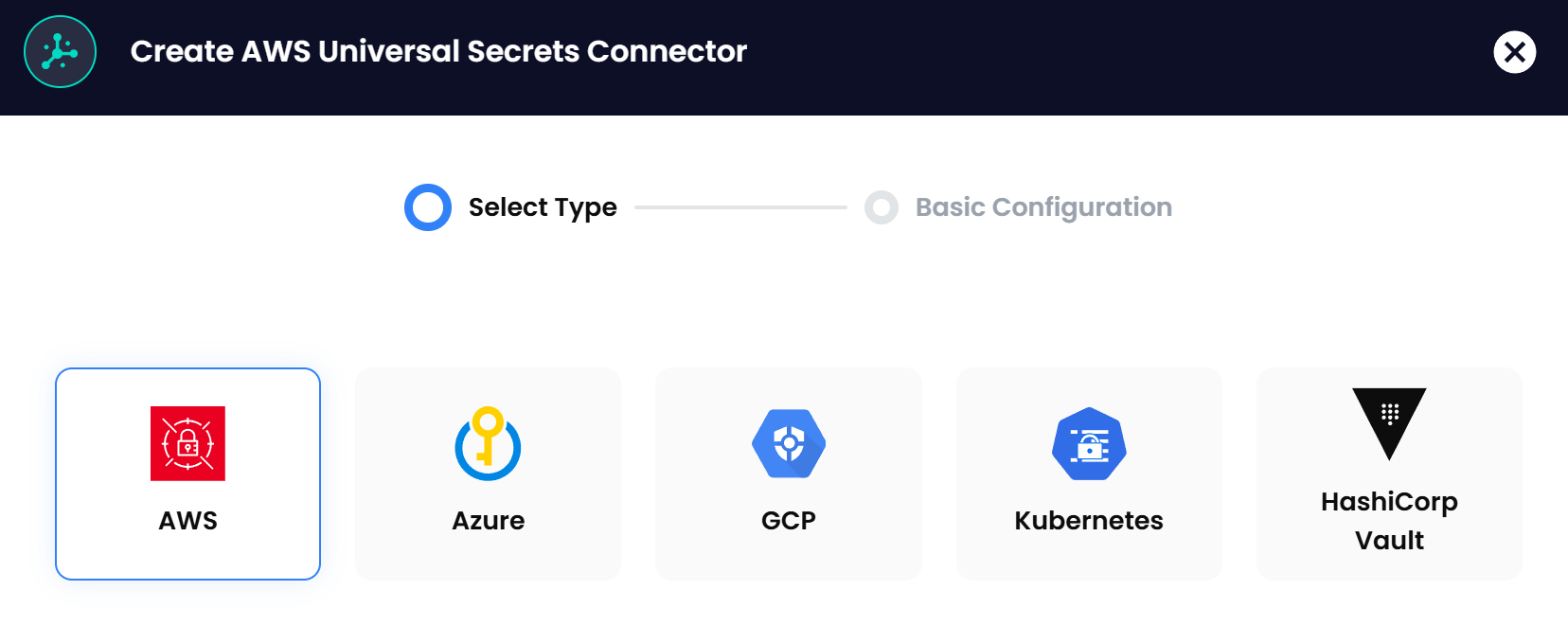
Akeyless USC provides a centralized platform for managing secrets across various cloud providers and platforms. It integrates seamlessly with AWS Secrets Manager, Google Secrets Manager, Azure Key Vault, Kubernetes, and HashiCorp Vault.

Centralized Management Across Platforms

With Akeyless USC, organizations gain a unified interface to manage secrets, eliminating the need to navigate multiple tools. This centralization simplifies administration and enhances security by providing consistent policies and controls.

No Migration Needed

One of the standout features of Akeyless USC is the ability to manage secrets without migrating them to a new system. Organizations can continue using their existing secrets managers while benefiting from centralized oversight.

Enhanced Security and Compliance

Akeyless USC offers centralized logging, monitoring, and auditing capabilities. This consolidation supports compliance efforts and provides better visibility into how secrets are accessed and used across the organization.

Simplified Authentication

By providing a single authentication point for multiple secret managers, Akeyless USC simplifies access control. Users can authenticate once to gain access to all authorized secrets, streamlining workflows and improving productivity.

Demo: Highlighting the Akeyless Universal Secrets Connector

Objective

In this section, we’ll demonstrate how Akeyless USC manages secrets across multiple platforms, enhances security, and simplifies authentication and access control. We have three examples to show below.

1. AWS Secrets Manager Sync with USC

In the Akeyless console, you can create Universal Secrets Connectors for different platforms. Let’s start with AWS. By configuring a connector for AWS Secrets Manager, you can view and manage your AWS secrets directly from Akeyless. Below is the view from Akeyless:
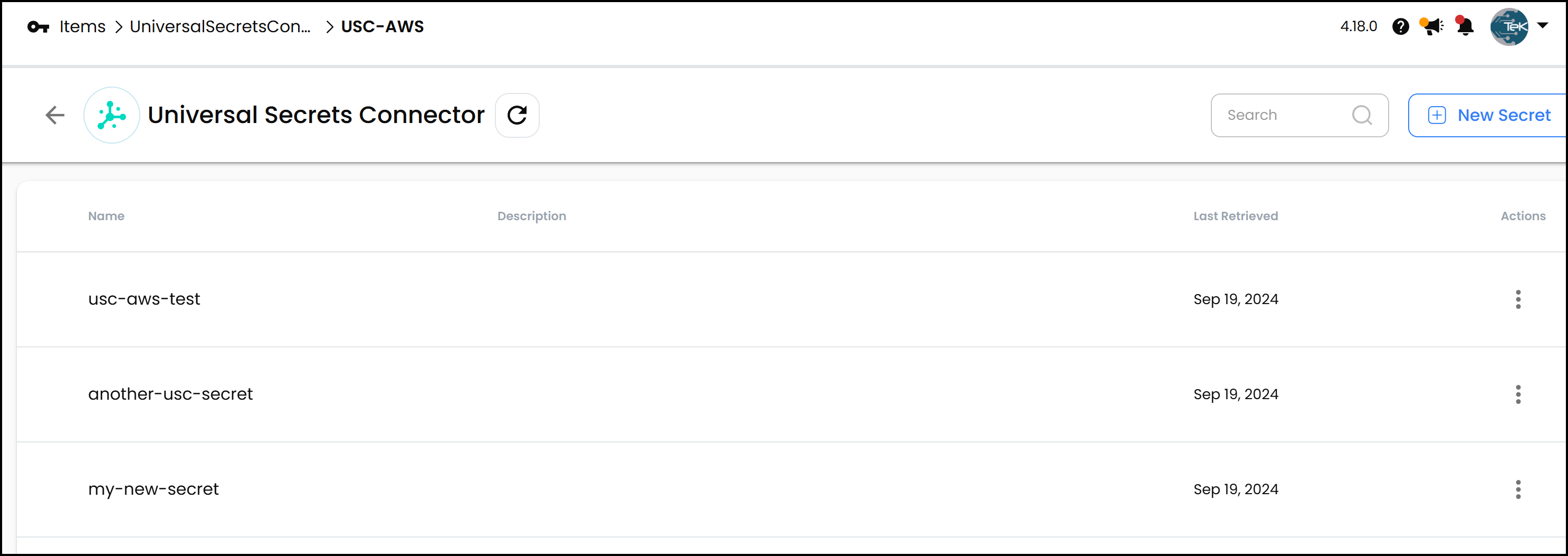
AWS Secrets shown in USC

For example, I have three secrets shown above in AWS Secrets Manager. These will appear in the Akeyless interface. You can view, edit, or delete these secrets from Akeyless, and any changes will sync with AWS. This is shown in the demo video at the top of this post.

Adding a new secret is seamless. If you create a new secret in AWS Secrets Manager—let’s say my_new_secret with a key-value pair of new_key: new_value—it will automatically appear in Akeyless after a refresh. This synchronization ensures that your secrets are consistent across platforms.

Below is the view in the AWS Console:
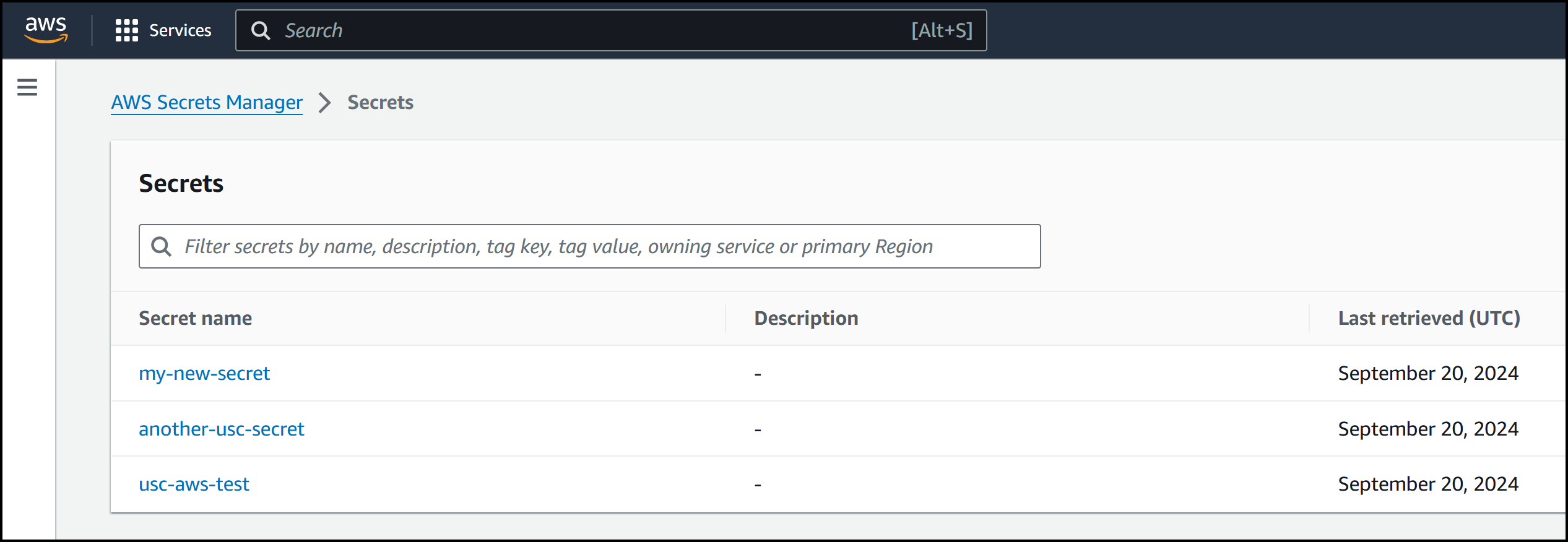
AWS Console showing Secrets

2. HashiCorp Vault Sync with USC

Similarly, you can connect Akeyless USC to HashiCorp Vault. After setting up the connector, all your Vault secrets become accessible through the Akeyless interface. Below is the view in Akeyless:
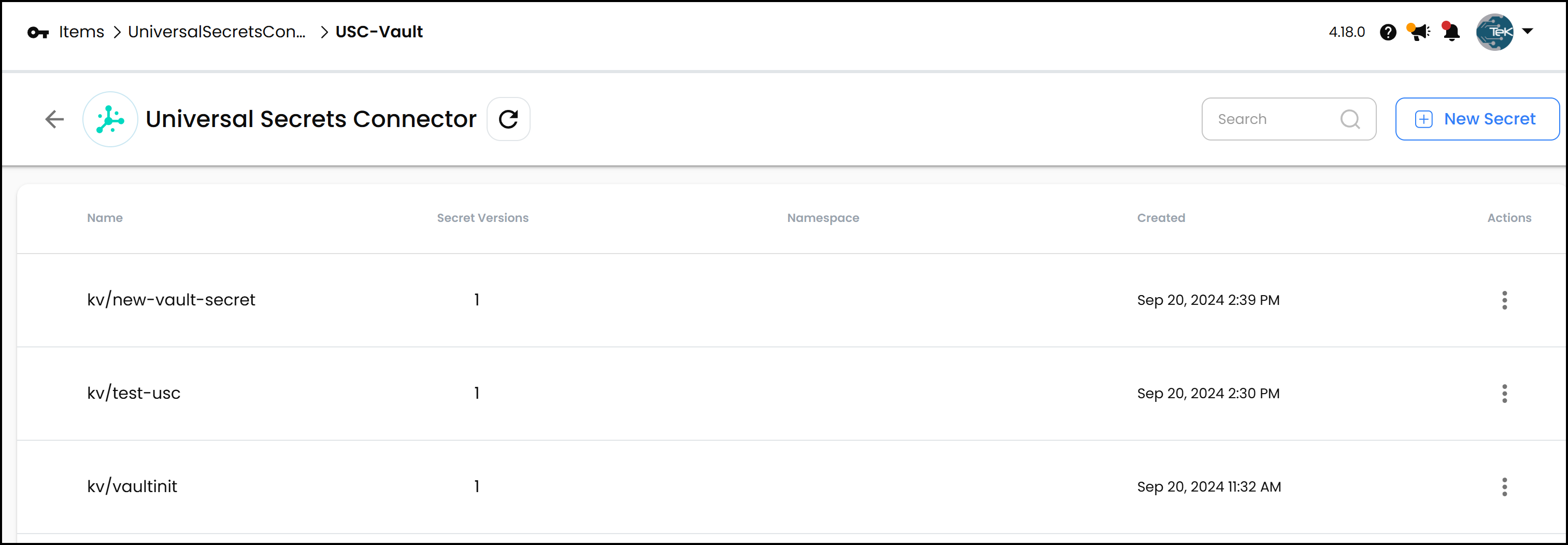
HashiCorp Vault Secrets shown in USC

We have a few secrets in HashiCorp Vault that are synced to Akeyless. If you add a new secret in Akeyless—let’s call it new_vault_secret with content foo: bar—it will appear in Vault instantly. Notice this time we created the secret in Akeyless as opposed to the first example where we created the secret first in AWS. This bidirectional sync keeps your secrets up-to-date, no matter where you manage them. Below is an image of the secrets in Vault:
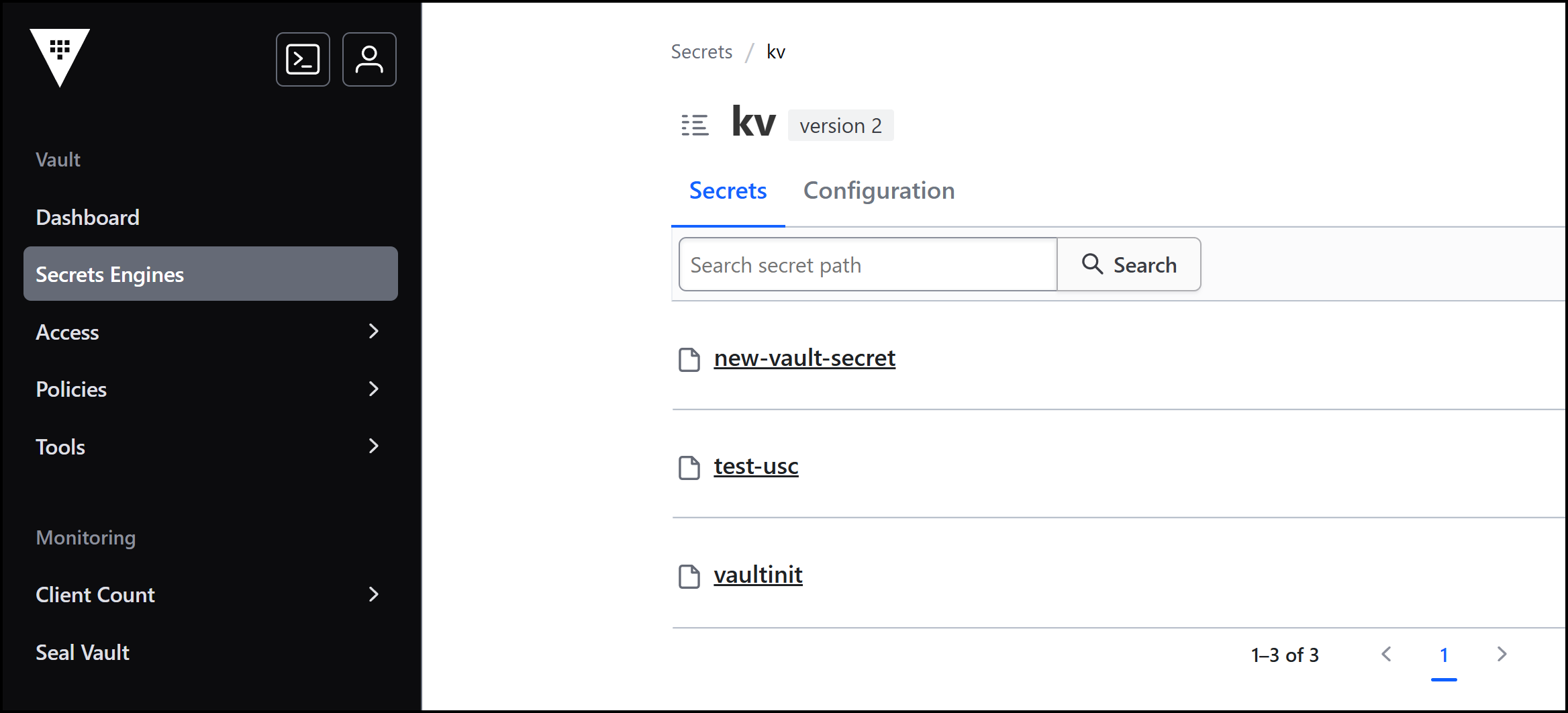
HashiCorp Vault UI showing Secrets

3. Kubernetes Secrets Sync with USC

Akeyless USC also supports Kubernetes secrets. By configuring a connector to your Kubernetes cluster, you can manage secrets stored in Kubernetes directly from Akeyless.
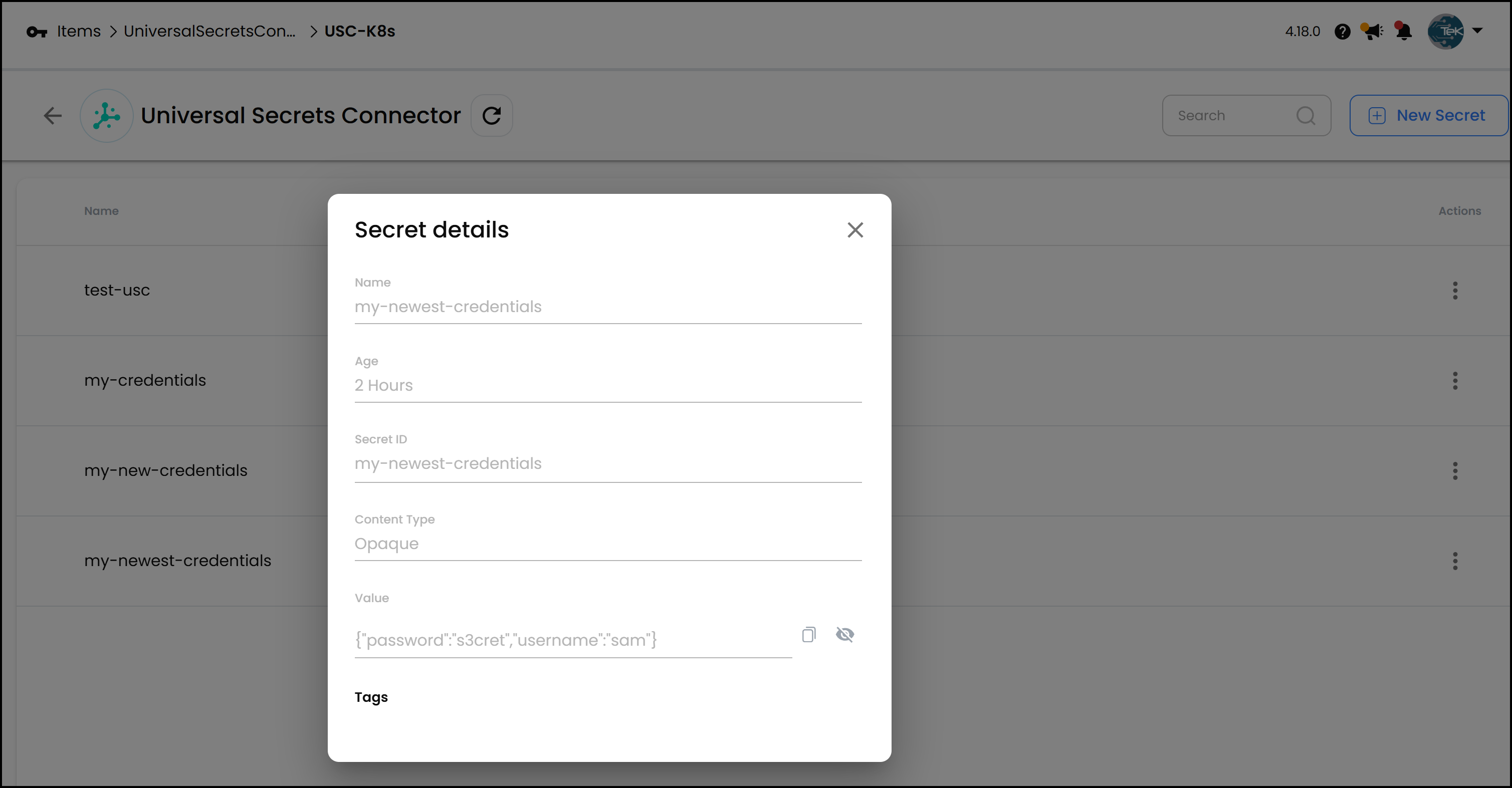
Kubernetes Secrets shown in USC

For instance, if you have a secret named test_usc in the default namespace of your Kubernetes cluster, you can view and edit it from Akeyless. If you create a new secret in Kubernetes—say my_newest_credentials with data username: sam and password: se3cret—it will show up in Akeyless as shown above.

You can also see the secret in Kubernetes as shown below.

$ kubectl get secrets
NAME                    TYPE     DATA   AGE
test-usc                Opaque   1      177m
my-credentials          Opaque   2      174m
my-new-credentials      Opaque   2      164m
my-newest-credentials   Opaque   2      157m

and the my-newest-credentials:

$ kubectl get secrets my-newest-credentials -ojson | jq -r '.data.username' | base64 --decode
sam
$ kubectl get secrets my-newest-credentials -ojson | jq -r '.data.password' | base64 --decode
s3cret

Configuring Universal Secrets Connector

Setting up connectors in Akeyless is straightforward. When adding a new Universal Secrets Connector, you select the platform (e.g., AWS, Kubernetes, HashiCorp Vault) and provide the necessary details.

Each connector requires a target, which is the endpoint of the secrets manager you’re connecting to. For example, connecting to HashiCorp Vault requires specifying the Vault’s URL and authentication token.
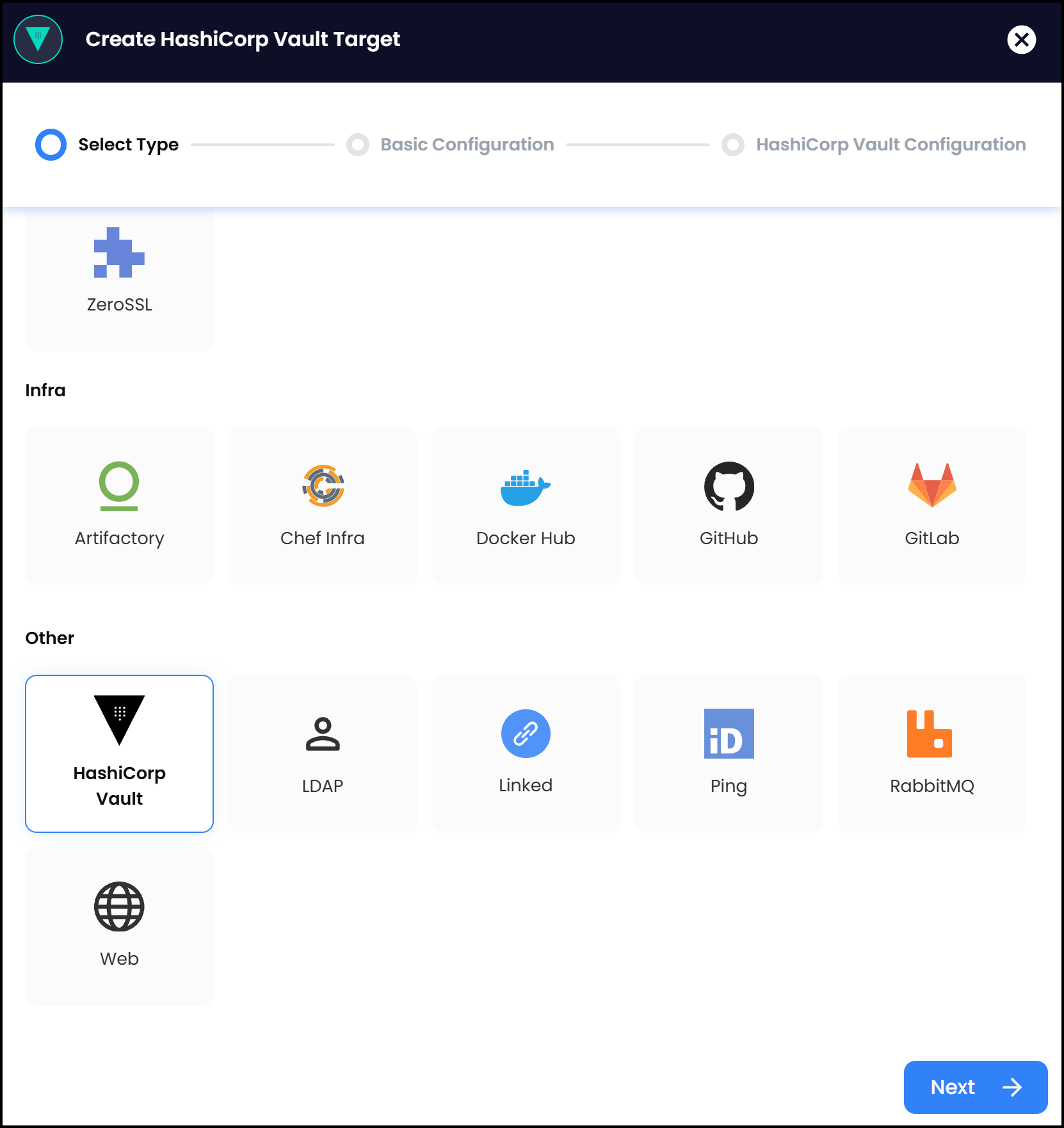
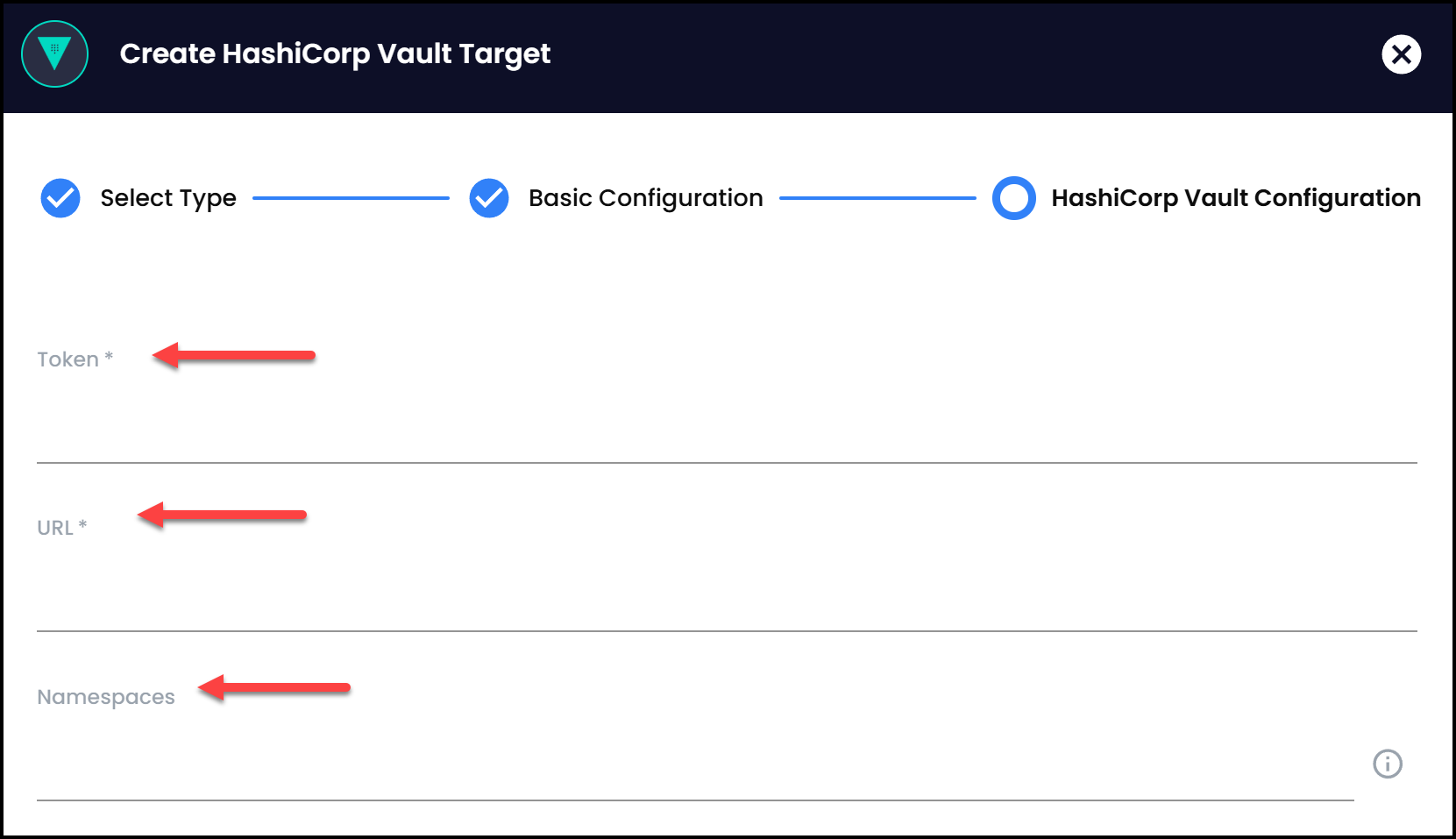
Creating a Vault Target
Parameters needed for a Vault target

Similarly, connecting to Kubernetes may involve using a service account or bearer token.

Setting Up Targets

Before configuring connectors, you need to define targets in Akeyless. Targets are the connection details that allow Akeyless to communicate with your secrets managers.

  • HashiCorp Vault: Create a target by specifying the Vault URL and a token for authentication.
  • Kubernetes: Use a gateway service account, a service account bearer token, or client certificate to authenticate.
  • AWS: Provide access keys to connect to AWS.
  • Azure and GCP: Similar configurations apply, requiring credentials and endpoints.

Once targets are set up, they can be used by the Universal Secrets Connectors to manage secrets across platforms.

Conclusion and Final Thoughts

Akeyless Universal Secrets Connector acts as a manager of managers for all your secrets managers. It addresses scenarios where teams need to use native secrets managers due to specific requirements while still providing centralized management and oversight.

By unifying access to AWS Secrets Manager, Google Secrets Manager, Azure Key Vault, Kubernetes, and HashiCorp Vault, Akeyless USC simplifies secrets management, enhances security, and boosts productivity. There’s no need for complex migrations or disruptions to your existing workflows.

I encourage you to explore Akeyless Universal Secrets Connector for your secrets management needs.
Suggested Reading

Never Miss an Update

The latest news and insights about Secrets Management,
Akeyless, and the community we serve.


Ready to get started?

Discover how Akeyless simplifies secrets management, reduces sprawl, minimizes risk, and saves time.

Book a Demo